



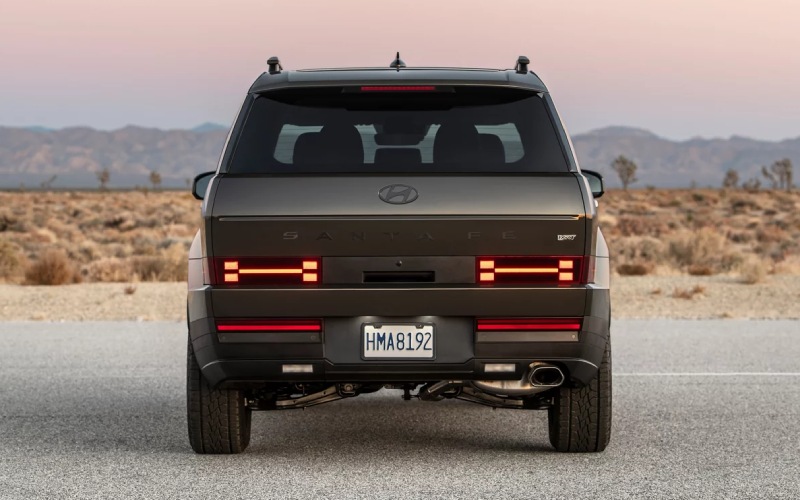
Hyundai of Grand Island – How does Bluelink+ remote start work on the 2026 Hyundai SANTA FE around Hastings, NE?
Starting your SUV from your phone is more than a party trick when you live and drive around Hastings and the Grand Island corridor. It is a daily convenience that helps you manage school drop-offs, shift changes at Mary Lanning, farmers market runs downtown, and game nights at Duncan Field without sitting in a cold or hot cabin. On the 2026 Hyundai SANTA FE, Bluelink+ makes remote start and other remote vehicle controls simple—and it is included with your purchase or lease with no monthly fees. Here is how it works, what you can expect in real Nebraska driving, and how we can help you set it up at Hyundai of Grand Island.
What Bluelink+ remote start does on the 2026 SANTA FE
Bluelink+ connects your 2026 SANTA FE to the MyHyundai with Bluelink app on your smartphone so you can start your vehicle, lock or unlock the doors, and activate climate control on trims equipped with dual automatic temperature control. That means you can preheat or precool from your phone before you walk out the door in Hastings, or while you are finishing checkout at Russ’s Market or an afternoon at Brickyard Park.
Because the SANTA FE is a three-row SUV that handles school carpools, gear, and groceries, the ability to manage the cabin temperature before everyone climbs in is a real ownership benefit. The app also lets you check vehicle status, confirm doors are locked, and locate your SANTA FE in a busy lot around US-34 or South Burlington Avenue.
- Remote start from virtually anywhere with a data signal
- Remote lock and unlock for quick peace of mind
- Climate activation on equipped trims for a comfortable cabin
- Vehicle status checks so you can confirm locks and windows
- Vehicle locator to help find your SANTA FE in larger lots
If you are comparing options for winter comfort around Hastings, note that remote climate activation works with the SANTA FE’s systems to bring the cabin toward your set temperature on equipped trims. You do not need to be within key-fob range—your phone app sends the command through the network to your SUV.
How to get set up once and use it every day
Getting Bluelink+ remote start working on your 2026 SANTA FE is straightforward. We can walk you through the steps in our showroom or service lounge, but here is the quick overview so you know what to expect.
- Download the MyHyundai app from your phone’s app store
- Create or sign in to your MyHyundai account
- Add your SANTA FE by VIN and verify ownership
- Activate Bluelink+ following the app prompts
- Enable notifications so you get confirmation alerts
Once it is active, you can open the app and tap Remote Start to wake the vehicle and begin warming or cooling. You can also lock or unlock the doors from the same screen and check whether windows or doors are secure before bed. For families who prefer phone-as-key access, the 2026 SANTA FE also offers Hyundai Digital Key 2 Premium, which lets you unlock and start with a compatible smartphone. Digital Key 2 Premium is separate from remote start—think of it as a hands-on replacement for the key fob, while Bluelink+ handles remote commands at a distance.
Local use cases around Hastings, NE
The more you use remote start, the more you will discover it fits naturally into how you already drive. Here are a few everyday examples we hear from SANTA FE owners who shop with us and live or work around Hastings.
- Morning school drop-offs where you want defogged glass and a warm cabin
- Weekend soccer at Libs Park or tennis at Hastings College when you want cabin cooldown
- Parking on gravel or along county roads where dust and wind make you want to stay inside a moment longer while the SANTA FE gets ready
- Date night downtown where a quick lock confirmation brings peace of mind
- Long shifts and late departures where you want the cabin ready as you walk out
For shoppers who split time between Grand Island and Hastings on US-281, Bluelink+ is especially handy. You can start the SANTA FE a few minutes before you arrive at a pickup, make sure doors are locked from your desk, or pull up the vehicle location if you parked a few blocks away from a local event.
Safety, limits, and what to know before you tap start
Hyundai designs remote start with smart safeguards. The SANTA FE must be in Park and the doors remain locked while the engine is running. There is also a limited run time window so you are not idling indefinitely. If the vehicle senses certain conditions—like the doors unlocking with a key, or the brake pedal being pressed without a key present—it will shut off to help deter misuse.
Connectivity matters. Bluelink+ uses network communication, so your phone and the vehicle both need a usable signal. Around Hastings and along rural stretches to Juniata or Inland, coverage can vary; most customers find commands process quickly in town and in the Grand Island area. If your phone loses data temporarily, the command will send once your connection returns. When in very low-signal areas, the key fob is still your instant-reach tool for unlock and, if equipped, fob-based remote start features.
If you drive a 2026 SANTA FE Hybrid, remote start works there, too. The hybrid system manages engine engagement automatically, so the gasoline engine may start as needed to achieve your requested cabin temperature.
Trim notes and feature availability
Every 2026 SANTA FE includes Bluelink+, which enables remote start, lock and unlock, and more through the MyHyundai with Bluelink app. Climate activation via the app functions on trims equipped with dual automatic temperature control. If you want to pair remote start convenience with other driver-assist tech for longer runs between Hastings and Grand Island, consider trims offering Highway Driving Assist, Surround View Monitor, and the available full-display digital rearview mirror. Our product specialists can help you compare SE, SEL, XRT, Limited, and Calligraphy to match your daily routine and tech preferences.
If you also want phone-as-key access, ask us about Hyundai Digital Key 2 Premium availability on the 2026 SANTA FE. You can lock, unlock, and start with a compatible smartphone and even share access digitally with family—great for teen drivers commuting to Hastings High or helping with errands.
We will help you set it up at Hyundai of Grand Island
We know your first week with a new SUV sets the tone for long-term ownership. When you take delivery at Hyundai of Grand Island, we will help you install the MyHyundai app, activate Bluelink+, and place the key features—remote start, lock and unlock, vehicle locator—front and center on your phone. Our non-commission product specialists can also walk you through Hyundai SmartSense technology, HTRAC All Wheel Drive options, and everyday convenience like the available full-display digital rearview mirror, so you feel confident from your first drive home on US-34.
If you would like a live demo, stop by our showroom at 3312 West Stolley Park Road in Grand Island, or schedule a test drive. We will set up Bluelink+ on your 2026 SANTA FE, show you how remote start behaves in real time, and tailor the tech to your family’s devices. From Adams Central school runs to weekends at Lake Hastings, we are here to make ownership simple.
Frequently Asked Questions:
Does Bluelink+ remote start cost extra on the 2026 SANTA FE?
Bluelink+ features like remote start, lock and unlock, and vehicle locator are included with your purchase or lease of a new Hyundai, with no additional monthly fees.
Will remote start work if my SANTA FE is parked in a garage?
Bluelink+ can send a remote start command to a vehicle parked in a garage, as long as the SUV and your phone have a usable network connection. Always follow safe ventilation practices whenever a vehicle is running in an enclosed space.
Do I need Hyundai Digital Key 2 Premium to use remote start?
No. Remote start works through the MyHyundai with Bluelink app and does not require Hyundai Digital Key 2 Premium. Digital Key 2 Premium lets you use a compatible smartphone as a key for lock, unlock, and drive without the key fob.
Does remote start work on the 2026 SANTA FE Hybrid?
Yes. You can remote start a 2026 SANTA FE Hybrid with Bluelink+. The hybrid system will manage engine operation automatically to help reach your climate setting as needed.
What if I am in a low-signal area between Hastings and Grand Island?
Bluelink+ commands require connectivity. In low-signal areas, commands may take longer or pause until your phone regains data. Your key fob remains the best immediate option when you are outside app coverage.
Can I schedule a remote start ahead of time?
You can initiate remote start from the app whenever you are ready and set app notifications to remind you, which many owners find works like a schedule. Ask our team to review the latest app features on your delivery day, since app capabilities may evolve with updates.
Will the SANTA FE stay locked while running after a remote start?
Yes. The doors remain locked during a remote start session. You will need your key or phone-as-key to enter and drive, and the SANTA FE includes safety interlocks to prevent unauthorized operation.
Ready to see Bluelink+ in action on the 2026 Hyundai SANTA FE? Visit Hyundai of Grand Island for a hands-on demo and a relaxed, local test drive that reflects real Hastings-area life. We will get your phone set up, your questions answered, and your next drive made easier before you leave our lot.
Request more 2026 Hyundai Santa Fe information
Connect with us


Hyundai of Grand Island
Address
3312 West Stolley Park Road
Grand Island, NE 68803
Phone
- Sales 308-318-3282308-318-3606
- Service 308-318-3848
- Parts 308-318-4342
| Monday | 8:00AM - 7:00PM |
| Tuesday | 8:00AM - 7:00PM |
| Wednesday | 8:00AM - 7:00PM |
| Thursday | 8:00AM - 7:00PM |
| Friday | 8:00AM - 7:00PM |
| Saturday | 8:00AM - 6:00PM |
| Sunday | Closed |
| Monday | 7:30AM - 6:00PM |
| Tuesday | 7:30AM - 6:00PM |
| Wednesday | 7:30AM - 6:00PM |
| Thursday | 7:30AM - 6:00PM |
| Friday | 7:30AM - 6:00PM |
| Saturday | Closed |
| Sunday | Closed |
| Monday | 8:00AM - 5:00PM |
| Tuesday | 8:00AM - 5:00PM |
| Wednesday | 8:00AM - 5:00PM |
| Thursday | 8:00AM - 5:00PM |
| Friday | 8:00AM - 5:00PM |
| Saturday | Closed |
| Sunday | Closed |