



How does Highway Driving Assist 2 work on the 2026 Hyundai SANTA FE Hybrid around St. Paul, NE?

Hyundai of Grand Island – How does Highway Driving Assist 2 work on the 2026 Hyundai SANTA FE Hybrid around St. Paul, NE?
Highway Driving Assist 2 on the 2026 Hyundai SANTA FE Hybrid is designed to reduce the mental load of long, steady drives while keeping you in command. If you spend time on US-281 or make regular trips between nearby towns, understanding what HDA 2 can do—and what it asks of you—helps you get the most out of this advanced driver-assistance technology.
At a glance, HDA 2 blends lane-centering with a set speed and following distance, then adds supportive lane-change assistance when conditions are appropriate. It works with Smart Cruise Control with Stop & Go and can take map cues from Navigation-based Smart Cruise Control with Curve Control on properly mapped highways, helping the SANTA FE Hybrid adjust speed for curves or speed-controlled zones. The system is there to support you, not replace you. You remain engaged, with hands on the wheel and eyes on the road, while the vehicle assists in maintaining smooth, confident progress.
What HDA 2 actually does on the road
Once activated, HDA 2 uses cameras and radar to help keep the SANTA FE Hybrid centered in its lane and traveling at your set speed with your chosen following distance. If the highway bends, the system provides supportive steering inputs to track the curve. If traffic ahead slows, it can reduce speed to match, then resume as traffic clears. Under certain conditions, HDA 2 can assist with lane changes after you signal and confirm that the next lane is clear, smoothly guiding the SUV into place when it’s appropriate to do so.
Pair HDA 2 with features like Blind-Spot View Monitor and Surround View Monitor on your SANTA FE Hybrid, and situational awareness increases even further. Blind-Spot View Monitor projects a live camera feed into the instrument cluster when you signal, while Surround View Monitor can help with low-speed maneuvers on either end of your trip. The result is a better sense of what’s around you before, during, and after your highway leg.
How to set up HDA 2 the right way
Before rolling out, check that your driver-assistance settings are configured the way you like. Confirm Smart Cruise Control with Stop & Go is available and that the instrument cluster shows HDA 2 on a suitable highway. Choose your following distance and cruising speed, then let the system help with lane centering where lane markings are visible. If Navigation-based Smart Cruise Control with Curve Control is active on a mapped route, the SANTA FE Hybrid may also adjust for posted speed zones and certain curves, then return to the set speed afterward.
Remember, HDA 2 is not self-driving and requires your attention at all times. Keep hands on the wheel, watch for system prompts, and be ready to steer or brake. The benefit is reduced effort on well-marked stretches, where the technology can help steady the vehicle and regulate distance more precisely than a human foot on a long day.
Why local drivers appreciate HDA 2
Drivers around St. Paul, NE often mix steady highway travel with quick town stops and rural connectors. HDA 2 takes the sting out of steady-state cruising while leaving you fully in charge as conditions change. When you hop off the highway into town, the rest of the SANTA FE Hybrid’s SmartSense features—Lane Following Assist, Forward Collision-Avoidance Assist with Pedestrian, Cyclist, and Junction Turning Detection, and Rear Cross-Traffic Collision-Avoidance Assist—continue supporting you as speeds drop and intersections increase.
It’s also worth noting how well the system integrates with the rest of the cabin technology. Large, clear dual 12.3-inch displays make it easy to confirm which assists are active, and Bluelink+ can keep your day in rhythm by preconditioning the cabin before you even step outside. If your SANTA FE Hybrid includes the available full-display digital rearview mirror, visibility stays strong even when the third row is in use or the cargo area is stacked with weekend gear.
Quick tips for first-time users
Set aside time on a quiet, well-marked highway to learn HDA 2 without distractions
Customize cruise following distance and confirm assist icons on the instrument cluster
Practice signaling early and let the system assist with lane changes when appropriate
Stay engaged with hands on the wheel and eyes up, ready to steer or brake at any time
Use Blind-Spot View Monitor and Surround View Monitor for an extra layer of awareness
As with any advanced assistance, familiarity builds trust. A few calm sessions make the interface second nature, so you can settle into the benefits on longer drives.
Where to try it and how we can help
If you want a guided introduction, ask for a test route that includes a highway segment and a few town transitions. Our team can illustrate how HDA 2, Smart Cruise Control with Stop & Go, and Navigation-based Smart Cruise Control with Curve Control interact on mapped stretches, then show how to dial the features to your comfort level. You pick the scenarios you care about most; we set up the demonstration.
For a friendly, straightforward walkthrough, reach out to Hyundai of Grand Island. Our product specialists can personalize settings, answer your layered questions, and map tips to your daily roads. You will also find us serving St. Paul, Central City, and Ord with test routes that reflect real local driving patterns, from steady highways to small-town streets and gravel connectors.
Frequently Asked Questions:
Can Highway Driving Assist 2 steer the vehicle by itself?
No. HDA 2 is a driver-assistance system. It supports lane centering and can assist with lane changes under certain conditions, but you remain responsible for driving with hands on the wheel and eyes on the road.
Does HDA 2 work on any road?
HDA 2 is designed for limited-access highways with clear lane markings. It will not operate on most city streets or roads without consistent markings.
How is HDA 2 different from Highway Driving Assist?
Both assist with lane centering and speed-distance management on highways. HDA 2 adds supportive lane-change assistance under certain conditions, further reducing effort on long stretches.
Will HDA 2 work in bad weather?
Performance can be limited by visibility, road markings, and sensor conditions. If cameras or radar cannot see clearly, the system may alert you and reduce or suspend assistance. Always drive for conditions and be prepared to steer or brake.
Request more 2026 Hyundai SANTA FE Hybrid information
Why the 2026 Hyundai PALISADE’s UV-C Sterilization Compartment Is a Smart Feature for Ravenna, NE Families
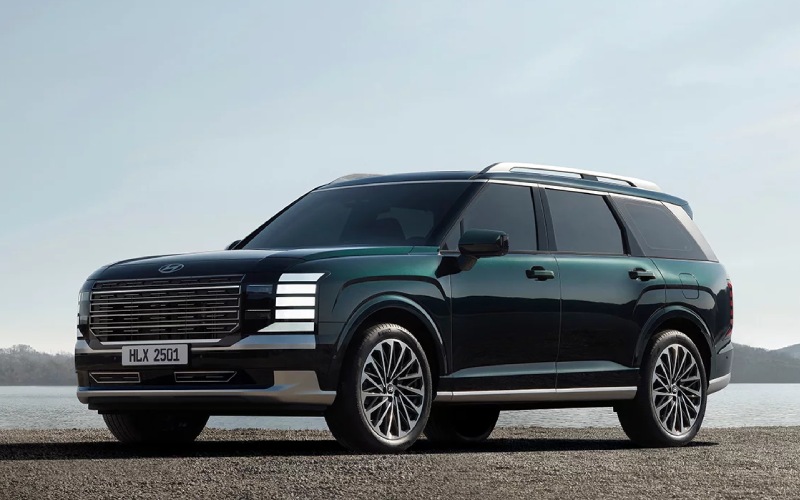
Hyundai of Grand Island – Why the 2026 Hyundai PALISADE’s UV-C Sterilization Compartment Is a Smart Feature for Ravenna, NE Families
The 2026 Hyundai PALISADE is loaded with meaningful conveniences, but one detail keeps surprising shoppers who slide into the second row: the available UV-C Sterilization Compartment. It is a small touch with outsized benefits, especially for busy families, youth coaches, and healthcare professionals commuting around Ravenna, NE. While many SUVs offer plus-size cargo space and plenty of charging ports, the PALISADE goes a step further by letting you quickly sanitize small items—think phones, pacifiers, earbuds, and keycards—without fumbling with wipes or sprays.
In a world where your hands are full and your calendar is packed, the ability to tap a built-in solution and keep moving is the kind of innovation that makes an SUV feel like it truly understands everyday life. The UV-C Sterilization Compartment does just that—quietly and efficiently—integrating a wellness-forward feature into an already refined cabin. It pairs seamlessly with the PALISADE’s family-first layout, 12.3-inch dual panoramic displays, and premium touches like available Nappa leather seating surfaces and 100W USB-C charging in all three rows.
How the UV-C Sterilization Compartment Works
It is designed to make quick sanitizing simple. Place your small item in the designated compartment, initiate the cycle per the on-screen prompts, and let the integrated UV-C light do its job. Because it is built into the vehicle, the system is secure, convenient, and available whenever you need a fast refresh between errands, practices, or shifts. No rummaging for a portable device or remembering batteries; the solution is always right there in your PALISADE.
What stands out most is how the feature complements the PALISADE’s connected cabin. While your device gets sanitized, your phone can continue to pair with the SUV’s infotainment through wireless connectivity, while Hyundai Digital Key 2 Premium—with shareable access via Apple Wallet®, Google Wallet™ and Samsung Pass®—keeps everyone moving efficiently.
Everyday Advantages for Ravenna, NE Drivers
Life around Ravenna brings a mix of open-highway jaunts, school pickups, and Saturday trips across Buffalo and Hall counties. In those routines, your family’s essentials get passed from hand to hand—water bottles, toys, and devices that hit floors and bleachers. The UV-C Sterilization Compartment offers a way to quickly sanitize the items you handle most often so you can focus on the next destination. Pair it with the PALISADE’s available 1st- and 2nd-row relaxation seats, and your interior becomes a calm, collected base of operations between stops.
Meanwhile, available HTRAC All Wheel Drive with Terrain Mode ensures you can tackle gravel spurs to trailheads or ballfields after a rain, and Highway Driving Assist 2 lends confidence for longer stretches to Grand Island. It is a well-rounded package—everyday wellness supported by proven capability.
Smart, Subtle, and Integrated
Because the UV-C Sterilization Compartment is tucked neatly into the cabin, it avoids clutter while adding real utility. This seamless thinking shows up elsewhere in the 2026 Hyundai PALISADE: a Camera Cleaning System that helps keep your rearview monitor and digital center mirror clear, an available integrated front- and rear dashcam that records while driving or when Parked Motion Detection senses movement, and Surround View Monitor for tight parking lots around schools or medical offices.
For families that share one SUV across multiple schedules, these systems collectively save time and reduce stress. It is not just about more features—it is about smarter ones that anticipate how you actually live and drive.
Tips for Getting the Most from the Feature
- Know the use-case: Reserve the compartment for small, everyday items—phones, pacifiers, earbuds, ID cards, or keys.
- Follow prompts: Use the on-screen instructions to start and complete cycles without distraction.
- Plan quick cycles: Run a sanitize cycle while you load groceries or buckle kids into their seats.
- Pair with cleaning habits: Use it alongside normal housekeeping to maintain a tidy, welcoming cabin.
Because the compartment is ready whenever you are, it slips into your routine without adding steps, which is the hallmark of good in-vehicle design. It is just one of the reasons local families tell us the PALISADE feels tailored to real life.
How It Fits with the Rest of PALISADE’s Tech
Consider the broader ecosystem of features that make this SUV so livable. The 12.3-inch touchscreen with navigation and available 12.3-inch digital instrument cluster create a panoramic view of your information. Alexa® Built-In lets you adjust climate or manage navigation with your voice, while Wi-Fi hotspot capability supports streaming or schoolwork on the way to practice. Add Hyundai Pay for select parking locations and Digital Features and Services (DFS) for downloadable themes—yes, including beloved characters in the Bluelink® store—and it becomes clear the PALISADE’s cabin tech is as thoughtful as it is advanced.
For families juggling schedules across town, the available Bose® Premium Audio transforms drive time into quality time. Meanwhile, power-folding outside mirrors, an Integrated Memory System for the driver, and abundant 100W USB-C charging ports help everyone settle in quickly so you can leave on time.
FAQ: Is UV-C Right for My Family?
The UV-C Sterilization Compartment is not a replacement for routine cleaning, but it absolutely enhances daily hygiene for items you handle repeatedly. If your day involves school runs, gym sessions, or healthcare shifts, the convenience speaks for itself. While you make the next turn, your items get a quick refresh—no extra bags or chargers to carry.
Paired with SmartSense safety features such as Highway Driving Assist 2 and Blind-Spot View Monitor, the PALISADE ensures that both your drive and your daily essentials are looked after. It is hard to overstate the peace of mind that brings when your days are full.
See It in Person
If you want to explore the UV-C Sterilization Compartment up close, schedule a visit with Hyundai of Grand Island. Our team can walk you through how it works, how it fits into your family’s routine, and how it complements other innovations like the integrated dashcam and Surround View Monitor. We are serving Ord, Aurora, and Ravenna with a relaxed, no-pressure approach so you can focus on what matters most: choosing features that truly fit your life.
Bottom line: the 2026 Hyundai PALISADE’s UV-C Sterilization Compartment is a small idea with a big impact, especially for active families around Ravenna, NE. Combine it with the SUV’s available HTRAC All Wheel Drive, premium seating options, and forward-thinking connectivity, and you have a three-row companion that keeps up with real life—messy, memorable, and always moving.
Request more 2026 Hyundai Palisade information
Should I get HTRAC All Wheel Drive on the 2026 Hyundai KONA for Central City, NE roads?
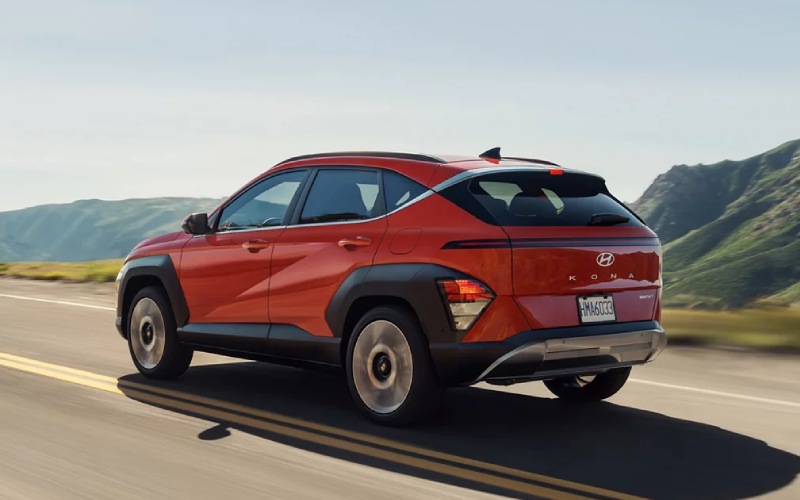
Hyundai of Grand Island – Should I get HTRAC All Wheel Drive on the 2026 Hyundai KONA for Central City, NE roads?
Choosing the right drivetrain is easier when you connect it to the roads you actually drive. If your weekly routine includes quick trips around town, a few highway stints, and the occasional gravel shortcut, the 2026 Hyundai KONA with available HTRAC All Wheel Drive is worth serious consideration for Central City, NE roads.
HTRAC is Hyundai’s smart, on-demand all-wheel-drive system that can actively distribute torque to help improve traction and stability. In a small SUV like KONA—already agile and easy to place in traffic—HTRAC adds secure footing without adding hassle. The system does its work in the background while you focus on steering, braking, and the flow of traffic.
What HTRAC adds to everyday KONA driving
Start with acceleration and lane changes. On-ramps or two-lane highways with uneven surfaces can make some small SUVs feel unsettled. HTRAC helps KONA stay planted, channeling torque to where it is most effective. The result is steadier pulls onto fast-moving traffic and composed passing that feels natural and confidence-inspiring.
Now think about mixed-surface errands—pavement to gravel, back to pavement. HTRAC adapts as you go. That means fewer traction surprises when you’re leaving a ball field, pulling out from a gravel shoulder, or dealing with dust-coated intersections after a dry spell. It all works seamlessly with Hyundai SmartSense features like Lane Keeping Assist (LKA) and Driver Attention Warning (DAW), which come standard on every KONA.
Do I need HTRAC if I do mostly city and highway?
It depends on your priorities. Front-wheel drive is smooth and efficient for primarily paved driving. If you add in uneven surfaces, frequent construction zones, or rural cut-throughs on the way to work or school, HTRAC is a smart upgrade. For drivers who want extra reassurance when roads are wet or dusty, or who occasionally head out on county routes to neighboring towns, the system’s value becomes clear fast.
Another factor is how much you carry. A couple of passengers and weekend gear? HTRAC’s torque distribution can help maintain composure during quick maneuvers and on higher-speed merges. It’s the kind of benefit you notice without needing to think about it.
How HTRAC pairs with KONA’s engines and tech
With the 2026 KONA, you’ll choose between the smooth, efficient 2.0L MPI 4-cylinder on SE and SEL Sport, or step up to the SEL Premium and Limited for the 190-hp 1.6L turbocharged GDI 4-cylinder with an 8-speed automatic. The turbo setup pairs especially well with HTRAC if you like brisk passing or drive with a full cabin. The extra traction translates power into forward motion with fewer wheelspin moments when you’re pulling away from a light on a dusty shoulder.
Inside every KONA, the standard 12.3-inch touchscreen and wireless Apple CarPlay® and Android Auto™ keep your maps and music front and center. If you grab the Limited, Hyundai’s premium camera-based systems level up tight-space confidence—Surround View Monitor (SVM), Blind-Spot View Monitor (BVM), and Remote Smart Parking Assist (RSPA) turn crowded lots into simple routines. HTRAC, power, and visibility tech together feel tailor-made for school pickups, grocery runs, and weekend drives around the area.
Who benefits most from HTRAC on KONA
- Commuters who mix highways with rural connectors
- Drivers who frequently park on gravel or unpaved shoulders
- Families who want added stability in rain or on dusty roads
- Shoppers who prefer crisp passing power with fewer traction hiccups
- Owners who value confidence without extra steps or settings
These everyday benefits fit neatly into how many of us actually drive. Add in KONA’s standard SmartSense safety, and HTRAC becomes part of a broader confidence story that makes this small SUV feel like the right tool for the job.
What about maintenance or fuel with HTRAC?
Because HTRAC is fully integrated and on-demand, it’s designed to work long-term without extra fuss on your end. Follow the maintenance schedule in your owner’s manual, and our service team can handle the rest with factory-trained expertise. As for efficiency, modern AWD systems are far less intrusive than older designs; the trade-off for added traction is modest and often well worth it for drivers who want that secure, planted feel year-round.
Trim guidance for Central City, NE drivers
If you’re leaning toward AWD, start your test drives with SEL Premium and Limited. SEL Premium unlocks the turbocharged engine, H-Tex® trimmed seats, and ambient lighting—an appealing balance of power and comfort. Limited goes further with premium parking and visibility features like RSPA, SVM, and BVM. If your routes include tight downtown spots or crowded events, those tools quickly feel indispensable.
Frequently Asked Questions:
Is HTRAC All Wheel Drive available on every 2026 KONA trim?
Yes. HTRAC All Wheel Drive is available across the lineup, so you can match your preferred features and budget to the traction you want.
Does HTRAC change how I use the vehicle day to day?
No. HTRAC works automatically in the background. You just drive normally and enjoy the added stability and traction benefits when conditions vary.
Can I combine HTRAC with the turbo engine?
Yes. On SEL Premium and Limited, you can pair HTRAC with the 190-hp 1.6L turbocharged GDI 4-cylinder and 8-speed automatic for responsive performance and confidence.
What other features pair well with HTRAC for foul weather or mixed surfaces?
SmartSense features are standard on every KONA, including Lane Keeping Assist (LKA), Lane Following Assist (LFA), and Forward Collision-Avoidance Assist with Pedestrian, Cyclist, and Junction Turning Detection and Direct Oncoming (FCA-JT DO). Limited adds camera-based aids like Surround View Monitor (SVM) and Blind-Spot View Monitor (BVM) for extra situational awareness.
If you’re still deciding, take two back-to-back drives—one front-wheel drive, one HTRAC—over the same roads. You’ll feel the difference where it matters most. Our team is here to help, serving Central City, Ord, and Aurora with side-by-side comparisons, trim insights, and smart test routes that reflect real local driving.
When you’re ready to explore your options, stop by or start online. We can set up a drive that covers pavement, transitions, and parking scenarios to showcase how HTRAC complements KONA’s already capable chassis and robust safety tech. Hyundai of Grand Island is here to help you get to the answer that fits your life best.
Request more 2026 Hyundai KONA information
Can three child seats fit across the 2026 Hyundai PALISADE second row near Hastings, NE?
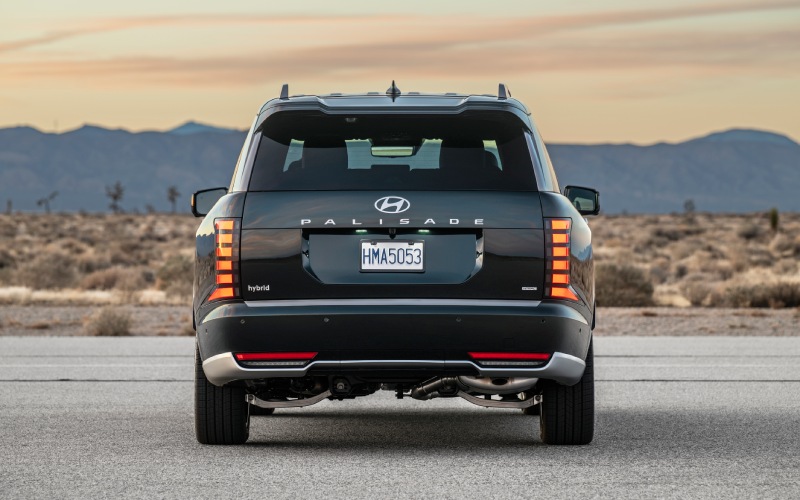
Hyundai of Grand Island – Can three child seats fit across the 2026 Hyundai PALISADE second row near Hastings, NE?
Families around Hastings often need their next SUV to solve a very practical challenge—securely fitting multiple child seats without turning everyday drop-offs into a juggling act. As a three-row SUV built for real life, the 2026 Hyundai PALISADE gives you space, thoughtful family tech, and flexible seating. Here’s how we help you determine whether three child seats can fit across the second row, and which configuration will work best for your routines, from Adams Central school runs to weekend games at Libs Park.
Two paths to kid-hauling success: bench vs. captain’s chairs
The 2026 PALISADE offers seating for 7 or 8, depending on whether you choose the available 2nd-row captain’s chairs or stick with the standard 2nd-row bench. Each layout serves families a little differently, and your decision should start with the number of car seats you need to install—and how often passengers will use the third row.
If your goal is three-across in the second row, the bench is the configuration to consider. Many families can make three-across work by mixing narrow infant, convertible, or high-back booster seats and securing at least one position with the seat belt (rather than the lower anchors) when appropriate and allowed by the child seat manufacturer. If your top priority is easier third-row access—and you typically run two car seats total—the 2nd-row captain’s chairs create a natural aisle for kids to slip to the back, which is especially helpful during busy pick-up lines along North Burlington Avenue or Highway 6.
Regardless of layout, PALISADE’s wide rear doors and generous second-row space make loading, buckling, and everyday wrangling easier. And features like available hands-free smart liftgate (SEL and up) add sanity points when your hands are full with diaper bags, backpacks, and a folded stroller.
What makes three-across more achievable in PALISADE
While every family’s combination of car seats is different, PALISADE’s roomy second row gives you a strong starting point. The 2026 model is designed to balance generous passenger width with easy entry and exit to all three rows. If your setup allows, placing one seat in the center position can increase the space available for the outboard positions—especially useful with narrow convertible or booster seats. When installed properly per your child seat and vehicle owner’s manuals, this approach can help you achieve a secure three-across configuration for everyday life around Hastings.
When you do need the third row, PALISADE still plays nicely with families. With the right mix of seats and placements, you can keep a path open to the back. And because the 2026 model emphasizes thoughtful touches—like abundant 100W high-power USB-C ports in rows 1 through 3—kids across all rows can keep tablets charged between Grand Island and Hastings without cord-sharing drama.
Safety and visibility features that reduce daily stress
The 2026 PALISADE is designed to support your focus, whether you’re navigating school zones or merging onto US-281. SmartSense Safety Suite is standard, and available systems bring extra confidence to tight parking lots and busy intersections:
- Surround View Monitor (SVM): Combines camera feeds to show a 360-degree bird’s-eye view, making it easier to maneuver in narrow spots at Hy-Vee or downtown Hastings.
- Parking Distance Warning (PDW): Helps you judge proximity when backing into a curbside space for quick drop-offs.
- Blind-Spot View Monitor (BVM): Shows a live camera view of the lane in your instrument cluster when you signal a lane change—handy when your view is partially blocked by rear-facing seats.
- Highway Driving Assist 2: An advanced, available feature that helps keep PALISADE centered and following at a set distance on longer stretches toward Kearney or Lincoln.
- Camera Cleaning System: Helps keep your rearview monitor and digital center mirror visible—useful after dusty gravel detours outside town.
These features don’t replace careful installation and safe driving, but they do relieve a lot of everyday friction, especially when your attention is split between kids and the road.
We also know Nebraska families value all-weather poise. Optional HTRAC All Wheel Drive—standard on XRT PRO—adds traction confidence for wet spring mornings and unpaved back roads around Adams County. It pairs with Terrain Mode for surfaces you’ll actually encounter between Hastings and area trailheads.
How to test-fit three-across at our store
Because every combination of seats and ages is unique, the smartest path is to test-fit your actual child seats in the exact PALISADE you’re considering. We encourage you to bring all your seats—base units included—so you can confirm access, buckling ergonomics, and comfort before you buy. To help you make the most of your visit, here’s a simple checklist you can follow on our showroom floor in Grand Island (just a straight shot from Hastings):
- Confirm your layout goals: Decide whether you want three-across on the 2nd-row bench, or two seats plus third-row access with captain’s chairs.
- Measure seat widths: Bring the exact child seats you plan to use and note their widest points to plan placements.
- Choose belt vs. lower anchors: Some three-across setups work best using a seat belt in the middle; follow your child-seat and vehicle manuals.
- Set front seats properly: Position front seats for safe adult driving posture, then verify rear-facing clearance behind them.
- Check buckle access: Make sure you can reach and secure buckles for boosters and the seat-belted center position.
- Test third-row access: If you’ll use the back row regularly, confirm how kids will get there with the seats installed.
- Do a full family dry run: Load everyone in and simulate your morning routine—from backpacks to buckles—to see how it feels.
Our non-commission product specialists will walk you through features, demonstrate adjustments, and give you time and space to evaluate the right configuration. For installation checks and best-practice guidance, we recommend consulting a certified Child Passenger Safety Technician (CPST) and following all instructions in your child-seat and PALISADE owner’s manuals.
Beyond fit, PALISADE’s convenience features make family life easier. Available Wi-Fi hotspot capability keeps schoolwork and streaming going on longer drives. Available Alexa® Built-In helps you manage navigation and audio by voice, while Bluelink® connected services let you personalize your profile and enjoy compatible features like Hyundai Digital Key 2 Premium—so caregivers can access the SUV with a compatible smartphone or wearable.
Inside, families appreciate available H-Tex® or Nappa leather-trimmed seating and available heated and ventilated 2nd-row seats (SEL Premium and up) for year-round comfort. And when you do need cargo flexibility, PALISADE provides up to 46.3 cubic feet of space with the 3rd row folded, or up to 86.7 cubic feet with both 2nd- and 3rd-row seats down—plenty for strollers, folding wagons, and sideline gear for a Saturday at Lake Hastings Park.
In short, if you’re a Hastings-area shopper wondering whether the 2026 Hyundai PALISADE can handle three car seats across the second row, the answer comes down to your specific seats and how you configure them—but PALISADE gives you the space, access, and safety tech to make it work. If you prefer easier third-row access with two seats, the captain’s chair layout is a great alternative. Either way, we’ll help you test-fit and choose the setup that fits your family best.
Frequently Asked Questions:
Can I fit three child seats across the 2nd-row bench in the 2026 Hyundai PALISADE?
With the right combination of narrow child seats and proper installation—often using the seat belt for the center position when allowed by the manufacturer—many families can achieve three-across. Because every seat is different, we invite you to bring your seats to Hyundai of Grand Island for a hands-on fit check before you buy.
Is it easier to use the 3rd row if I choose 2nd-row captain’s chairs?
Yes. The available captain’s chairs create an open aisle that makes third-row access straightforward for kids and caregivers. If you typically use two child seats and load passengers into the third row frequently, this layout can simplify everyday routines around Hastings.
Will the 2026 PALISADE handle gravel or unpaved roads on the way to practices and parks?
Optional HTRAC All Wheel Drive—standard on XRT PRO—enhances traction on low-grip surfaces and pairs with Terrain Mode to tailor responses for varied conditions. It’s a confidence booster when your route includes gravel or dusty county roads outside town.
What features help with tight school and store parking lots?
Available Surround View Monitor (SVM) gives you a 360-degree bird’s-eye view for precise maneuvering, while Parking Distance Warning (PDW) helps with close-quarters awareness. The available Camera Cleaning System helps keep your views clear after slush or dust.
Are there enough ports to keep everyone charged?
Yes. PALISADE offers 100W high-power USB-C ports in the 1st, 2nd, and 3rd rows, so tablets and phones stay powered on game days and road trips between Hastings and Grand Island.
Which trims should I consider if I’m installing child seats regularly?
All trims offer SmartSense Safety Suite, but families often prefer trims with added convenience: SEL for the hands-free smart liftgate; SEL Premium for Surround View Monitor and heated/ventilated 2nd-row seats; Limited or Calligraphy for premium comfort features. We can help you compare them side by side.
We’re ready to help you find the right 2026 Hyundai PALISADE and verify your child-seat setup in person. Bring your family, your car seats, and your everyday gear to Hyundai of Grand Island, and we’ll make sure your next SUV fits the way you live around Hastings—today and as your crew grows.
Request more 2026 Hyundai Palisade information
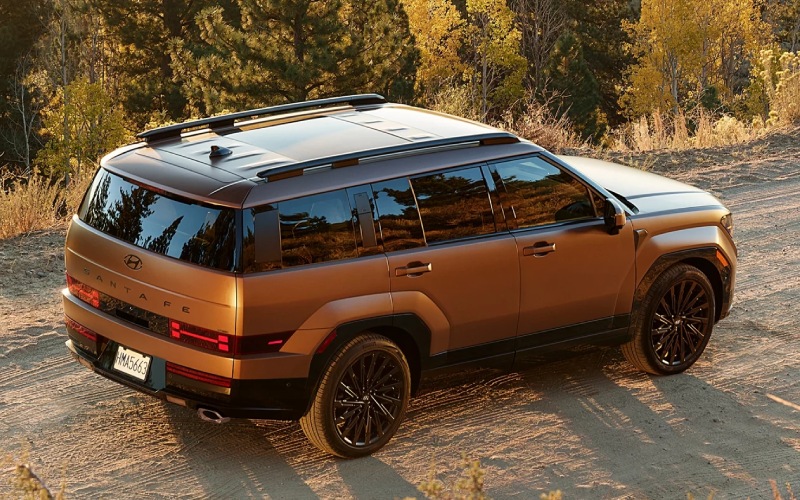
Hyundai of Grand Island – Can I load a roof cargo box or kayaks on the 2026 Hyundai SANTA FE near St. Paul, NE?
If your weekends around St. Paul, NE include quick runs up Highway 281, mornings at Sherman Reservoir, or hauling extra gear to youth sports, it is natural to wonder how easy it is to use the roof on a 2026 Hyundai SANTA FE for a cargo box or kayaks. At Hyundai of Grand Island, we help local drivers set up their SANTA FE for real life—gravel roads, prairie crosswinds, crowded trailhead parking—and this guide focuses on how the SANTA FE’s design, available features, and Hyundai accessories can make roof loading simpler and safer.
Why roof loading matters for St. Paul, NE drivers
Life in Howard County often means you need flexible cargo options. The 2026 SANTA FE delivers three-row versatility inside, but there are days when coolers, paddles, life jackets, and camping gear all need to come along. Roof solutions keep the cabin open for passengers and pets, and they can be the difference between taking one vehicle instead of two. Around St. Paul, NE, you also contend with frequent winds and long stretches of open highway—conditions where a stable, well-secured roof load matters.
The good news is that SANTA FE was engineered with everyday usability in mind. Along with three roomy rows and an available hands-free smart liftgate with auto open, SANTA FE offers an available C-pillar assist handle designed to help you step up and reach the roof cargo more easily. Paired with Hyundai Genuine crossbars and kayak or cargo box attachments from our Parts Department, you can create a clean, secure setup for local trips and longer drives.
How the available C-pillar assist handle helps you reach the roof
Loading roof gear is all about confident footing and controlled movement. SANTA FE’s available C-pillar assist handle gives you a stable handhold so you can step up and manage straps or lift a box with better balance. It is a small touch that makes a big difference when you want to maintain three points of contact and avoid leaning on painted panels. For taller items or heavier kayaks, bring a folding step-stool for the final lift and always recruit a second set of hands when possible.
Before you load anything, install quality crossbars that match SANTA FE’s factory mounting points. Genuine Hyundai crossbars are engineered for proper fit, and our team can walk you through placement and torque guidance per the Owner’s Manual. Position accessories so they do not interfere with the antenna or liftgate and confirm you have clear strap paths that will not rub on door edges or weatherstripping.
Visibility and maneuvering are also easier thanks to SANTA FE technology. The available full-display digital rearview mirror shows a real-time video view from a rear-spoiler camera, which can help you see behind even when passengers or cargo would normally block the mirror. Limited and Calligraphy also include Surround View Monitor (SVM) to give you a 360-degree bird’s-eye view when you are inching into a garage or backing near a fence line.
As you plan your setup, use the following quick-start checklist to streamline roof-loading days around St. Paul.
- Park level and secure the vehicle with the parking brake
- Install and check crossbars for correct position and tightness
- Stage straps, bow and stern lines, and padding before you lift
- Use the available C-pillar assist handle for safer reach
- Keep straps flat and away from door seals and paint
- Retighten straps after the first few miles of driving
- Mind overall height for garages, underpasses, and tree limbs
- Watch for wind gusts on open stretches and adjust speed
Kayaks vs. cargo boxes on SANTA FE
Kayaks and cargo boxes each have advantages, and SANTA FE accommodates both well when you use the right attachments. For kayaks, saddle mounts or J-cradles help distribute weight and provide sturdy tie-down points. Always add bow and stern lines to the front and rear tow points for extra stability in Nebraska crosswinds. Keep lines clear of lighting and sensors, and verify steering has full, unimpeded range lock-to-lock before you head out.
If a cargo box is your go-to for seasonal gear, select a length that opens fully without contacting the liftgate. Many boxes allow you to slide their mounting feet on the crossbars so you can tune the position for hatch clearance. With SANTA FE’s hands-free smart liftgate with auto open, always confirm there is room to open before you activate it—particularly in garages or when another vehicle is parked close behind. If you often load under low overhangs around town, ask our team to show you best practices for managing liftgate operation around roof gear.
On the road between St. Paul and Grand Island, taller loads will catch more wind. The SANTA FE’s stable chassis and available Hyundai SmartSense technologies help reduce fatigue on longer drives. Lane Following Assist helps keep you centered, and Smart Cruise Control with Stop & Go can help manage following distance. As always, stay attentive to changing winds and allow a little more braking distance.
Tech that makes loaded-up drives easier
Back at the trailhead or in a downtown St. Paul lot, the right driver-assistance features make tight parking less stressful. On Limited and Calligraphy, Surround View Monitor (SVM) and Parking Distance Warning help you gauge clearances with a roof box overhead. Remote Smart Parking Assist (RSPA) lets you step out and guide SANTA FE into or out of a spot using the Smart Key, which is helpful when adjacent vehicles or light poles narrow your door swing.
Bluelink+ adds convenience at the water or campsite. Use the MyHyundai with Bluelink app to lock or unlock and, on properly equipped models, remotely start SANTA FE and set the climate while you are finishing up at the dock. Dual wireless device charging is available inside to keep phones topped up, and the available full-display digital rearview mirror helps preserve rearward visibility if your rear window is obscured by cargo or passengers.
Pro tips from our team near St. Paul
We have helped many local families set up roof systems for fishing weekends, cross-country trips, and school events. These simple steps can keep your SANTA FE and your gear in great shape.
- Check your Owner’s Manual for roof equipment and attachment guidance
- Fit crossbars first and confirm even spacing and secure attachment
- Lift with two people for kayaks or long boxes
- Use bow and stern tie-downs for long loads
- Do a short shakedown drive and retighten everything
- Rinse road dust off straps and mounting pads after gravel travel
- Store boxes and cradles out of the sun when not in use
If you drive gravel county roads to reach the Middle Loup River or trailheads, dust can work its way under pads and straps. A quick rinse when you return prevents abrasion on paint and helps your gear last. On windy days, reduce speed and take breaks; the flat expanse north of St. Paul is famous for gusts that add extra load to roof-mounted items.
Most importantly, always follow the mounting instructions for your specific attachments and check all fasteners at regular intervals. Your Owner’s Manual provides the authoritative guidance for roof equipment and attachment practices on your SANTA FE. If you need help selecting, installing, or demonstrating accessories, our Parts and Service teams are here to assist.
Not sure whether a given box or kayak mount will fit your routine? Bring it by Hyundai of Grand Island. We can test-fit on a SANTA FE, show you how the available C-pillar assist handle improves reach, and verify hatch clearance and camera views before you buy. That way, your next trip to Sherman Reservoir or a quick hop to River Park in St. Paul is easy from the first loading strap to the last mile home.
Frequently Asked Questions:
Which 2026 SANTA FE trims include the available C-pillar assist handle?
The C-pillar assist handle is available on select SANTA FE configurations. Availability can vary by trim and package. We will confirm what is on each vehicle in our inventory and help you experience it in person.
Will a roof cargo box block the full-display digital rearview mirror?
The mirror displays a live video feed from a rear-spoiler camera. Because most boxes mount above and forward on the roof, the camera view often remains clear. We recommend a quick test with the box installed to confirm visibility on your specific setup at our dealership.
Can I still use the hands-free smart liftgate with a roof box installed?
You can use the hands-free smart liftgate with auto open when there is adequate clearance behind and above the vehicle. Always verify space before activating the liftgate and be cautious in garages or near low overhangs. Our team can walk you through best practices for operating the liftgate around roof cargo.
Do I need HTRAC All Wheel Drive for gravel roads or boat ramps around St. Paul?
HTRAC All Wheel Drive can enhance traction on loose surfaces and in changing weather, and many local shoppers choose it for added confidence. Front-wheel drive SANTA FE models are also capable for everyday use. We will help you decide based on where you drive most.
Does Hyundai offer Genuine crossbars and kayak mounts for the 2026 SANTA FE?
Yes. We offer Genuine Hyundai accessories for crossbars and cargo, along with select partner solutions. Our Parts Department can recommend a system that fits your needs and arrange professional installation.
See how easy roof loading can be at Hyundai of Grand Island
Bring your gear to our showroom and try it on a 2026 Hyundai SANTA FE. We can set up Hyundai Genuine crossbars, demonstrate the available C-pillar assist handle, and show you how features like the full-display digital rearview mirror, Surround View Monitor, and Remote Smart Parking Assist make daily life easier. If you are coming from St. Paul, NE, we are an easy drive down Highway 281—visit us to find the right SANTA FE and roof solution for your next adventure.
Request more 2026 Hyundai Santa Fe information
Your Local Advantage for Buying, Financing, and Service — Hyundai Dealer in Grand Island, NE

Hyundai of Grand Island – Your Local Advantage for Buying, Financing, and Service — Hyundai Dealer in Grand Island, NE
Shopping for a vehicle should feel straightforward, transparent, and neighborly. That’s exactly what you can expect at Hyundai of Grand Island, your Hyundai Dealer in Grand Island, NE. Located right in the heart of Hall County with easy access from US-281 and Highway 30, our dealership is built around a simple idea — make every step of car ownership easier, from test drives and trade-ins to financing and long-term service support.
We take pride in doing things the right way for local drivers. Our non-commission Product Specialists focus on listening first and guiding second, so your goals drive the process — not pressure. We also follow a One Low Price philosophy that keeps the experience clear and consistent. Whether you’re commuting across town, heading out toward rural county roads, or tackling daily errands around Railside and the West Stolley Park corridor, our team is here to match you with the right vehicle and the right plan.
Inventory that Fits Real Life in Central Nebraska
The showroom at Hyundai of Grand Island reflects how people around Grand Island actually drive. You’ll find a broad selection of new Hyundai models, Certified Pre-Owned options, and quality used vehicles across body styles and footprints. If your days include highway merges on US-281, in-town parking near local shops, and the occasional gravel-road detour, we can walk you through features like HTRAC All Wheel Drive, Hyundai SmartSense driver-assistance technologies, and comfort-first amenities that keep daily life simple.
We’re also a knowledgeable resource for electrified choices, including hybrid and fully electric options within the IONIQ family. Our team can explain how charging fits into a Grand Island routine, what to expect from regenerative braking, and which driver-assistance systems — like Highway Driving Assist, Forward Collision-Avoidance Assist, and Lane Keeping Assist — are designed to support confidence on both wide-open stretches and stop-and-go surface streets.
Clear Trade-Ins and Streamlined Financing
Trading in should be easy to understand, so we begin with a market-informed evaluation and present your vehicle’s actual cash value clearly. You’ll see how we arrive at the number, and you can choose what works best for your situation — even if you decide to sell to us without purchasing that day. This approach keeps your options open and your next steps simple.
Financing is designed to be just as straightforward. Our finance professionals work with national partners and local Nebraska banks to tailor a plan that aligns with your budget. Whether your credit is strong, new, or in the process of rebuilding, we’ll review options side by side, explain terms in plain language, and help you get pre-approved quickly. Prefer to start from home? Use our online pre-approval and payment estimate tools to map out a confident plan before you set foot in the showroom.
Service That Protects Your Time and Your Vehicle
Our service center is equipped with state-of-the-art diagnostic tools, and our factory-trained technicians know Hyundai vehicles inside and out. Genuine OEM Hyundai Parts help ensure a proper fit and long-term performance, and our processes are built around consistency — the same meticulous standards for a routine oil change as for complex electrical diagnostics. While you wait, you’ll find a comfortable lounge with Wi-Fi and refreshments, and our scheduling options help you plan maintenance around work, school pick-ups, and weekend plans.
If you’re curious about technology or simply want a quick refresher, our team can demonstrate features like Bluelink+, Remote Smart Parking Assist, Ultrasonic Rear Occupant Alert, and Safe Exit Assist. We’ll show you how to set up profiles, customize alerts, and make the most of the tech that simplifies everyday driving around Grand Island.
What You Can Expect When You Shop With Us
From first visit to long-term ownership, we make the experience consistent and convenient. Here’s what that looks like in practice:
- One Low Price: We share our best price up front to eliminate guesswork and back-and-forth.
- Non-Commission Product Specialists: Our team is focused on your satisfaction, not on higher sales figures.
- Trade-In Transparency: We explain market data, condition, and real cash value clearly.
- Quick Approvals: We partner with trusted lenders to streamline financing and paperwork.
- Right Vehicle at the Right Time: If we don’t have the exact match today, we’ll locate it for you.
- Added Confidence on Pre-Owned: Ask about our straightforward exchange and return options on qualifying vehicles, with simple conditions that keep things fair and easy.
Why Our Location Works for Your Day-to-Day
Grand Island’s mix of in-town errands, school drop-offs, weekend trips, and regional commutes calls for vehicles and processes that flex with your life. Our approach reflects that local reality:
- Easy Access: Reach us quickly from US-281 and Highway 30, and be on a test drive in minutes.
- Test-Drive Variety: Try routes that include surface streets, highway speeds, and light industrial areas for a real-world feel.
- Rural-Ready Advice: Get guidance on ground clearance, all-season traction, and driver-assistance settings that support unpaved or uneven roads.
- Electrified Know-How: Learn how charging, range planning, and regenerative braking fit everyday Grand Island driving.
- Seamless Service Visits: Schedule online, plan while-you-wait appointments, and count on consistent communication.
We’re proud to be part of the local community, and we back that up by making every step — selection, trade, financing, and care — as smooth and predictable as possible. Our neighbors rely on us for clear answers, real timelines, and vehicles equipped for daily life in central Nebraska.
Frequently Asked Questions:
Can I get pre-approved before I visit?
Yes. Start an online pre-approval to see potential terms and estimated payments. When you arrive, we’ll finalize details quickly so you can focus on vehicles and test drives.
How does the trade-in process work?
We appraise your vehicle using market data and condition, then share its actual cash value with a clear breakdown. You can apply that amount toward your next vehicle or sell outright — your choice.
Do you have Certified Pre-Owned Hyundai vehicles?
We maintain a rotating selection of Certified Pre-Owned options. Every CPO Hyundai is thoroughly inspected and supported by manufacturer-backed benefits for added peace of mind. Ask us about current availability and program details.
What technology support do you offer during delivery?
We’ll help you personalize driver profiles, pair devices, set up Bluelink+, and walk through features such as Hyundai SmartSense, Remote Smart Parking Assist, and Highway Driving Assist. You’ll leave with a vehicle that’s dialed in for your day one.
Can I schedule a specific test-drive route?
Absolutely. Tell us how you drive — short commutes, highway miles, or occasional unpaved roads — and we’ll plan a route that mirrors your routine so you can experience real-world comfort, visibility, and driver assistance.
Do you serve nearby communities?
Yes — we are proud to be serving Hastings, St. Paul, and Central City in addition to our Grand Island neighbors. If you’re coming from out of town, we’ll help you save time with online pre-approval and flexible appointment options.
When you’re ready to move forward, you’ll find a team committed to clarity and long-term confidence. We believe that all the best parts of car shopping — selection, guidance, and service — should feel friendly and efficient from start to finish. Your questions are always welcome, and your goals always come first.
If you want a dealership experience that respects your time, understands local driving needs, and supports you long after delivery day, our doors are open. Connect with Hyundai of Grand Island today to request more information, schedule a test drive, or start your pre-approval — and let’s make your next vehicle decision simple and confident.
Request more information
Hyundai of Grand Island – Which three-row SUV makes parking and visibility easier around Central City, NE — the 2026 Hyundai PALISADE or 2026 Mazda CX-90?
When shoppers ask us which three-row SUV simplifies parking and low-speed maneuvering the most, it usually comes down to how completely the vehicle integrates cameras, driver-assistance systems, and smart convenience features you’ll use every day. The 2026 Hyundai PALISADE and the 2026 Mazda CX-90 both offer advanced camera tech and helpful assistance, but they take notably different approaches. If tight parking at ballfields, downtown lots, or school pickup is part of your daily rhythm, those differences can become the deciding factor.
Below, we dig into the everyday parking and visibility features that matter — from surround-view cameras and see-through perspectives to automated parking and lens-cleaning — so you can choose with confidence.
Top-down awareness: Surround views that actually help
Both SUVs offer a bird’s-eye camera system that fuses multiple feeds into a single “top-down” perspective on the center display. In practice, this makes it much easier to see curbs, lines, and hazards in crowded lots.
- PALISADE Surround View Monitor (SVM): Combines front, side, and rear cameras into a clear 360-degree image to simplify precise positioning and trailer hookups.
- CX-90 360° View Monitor with See-through View: Enhances the forward camera to help you visualize what’s directly ahead of the hood in tight quarters, and offers a Trailer Hitch View on select trims.
Both are excellent, but Hyundai pairs its system with additional everyday helpers that reduce stress in tight spaces.
Automation and assistance: When the SUV parks itself
This is where the PALISADE creates meaningful separation. Available Remote Smart Parking Assist can help guide the vehicle into or out of a space while you watch from outside — a powerful tool for narrow garages, tight parallel spots, or when a large vehicle parks too close to your driver’s door. Mazda CX-90 does not offer a comparable automated parking system, though its driver-assistance suite is strong in other areas.
Why does this matter? Because real-life parking around schools, medical offices, and busy weekend venues is often tight, and having the SUV do the careful inching for you makes a stressful moment easier. It’s the kind of feature that quickly becomes a favorite for families and professionals alike.
Clarity in all weather: Keeping your view clean
Nebraska dust, rain squalls, and winter slush can quickly degrade camera clarity. PALISADE’s available Camera Cleaning System helps keep the rearview monitor and the digital center mirror camera clean, improving visibility when you need it most. Paired with the available Blind-Spot View Monitor, which displays a live camera feed in the instrument cluster when you signal, the Hyundai turns previously hidden zones into clear information. CX-90’s 360° system is impressively detailed, but it doesn’t pair with a factory camera cleaning function in the way the Hyundai does.
The extra layer: Built-in recording and parking protection
A standout PALISADE feature is the available integrated front and rear dash cam. It can record while driving, and with Parked Motion Detection, it can capture events when you’re away. For parents and professionals who park at busy lots or street curbs, that peace of mind is hard to beat. Mazda CX-90 offers accessories and strong security features, yet it does not feature a factory-installed, integrated dash cam with parked recording like the Hyundai system.
Smart keys and easy handoffs: Getting everyone on board
Parking as a team is often easier when sharing access among family members. Hyundai Digital Key 2 Premium lets compatible smartphones and wearables unlock, start, and drive the PALISADE, and you can securely share keys via Apple Wallet®, Google Wallet™, or Samsung Pass®. That kind of flexibility helps when a spouse needs to swing by the school lot or a neighbor needs to move your SUV in a pinch. Mazda’s MyMazda app supports remote start and locking, but it is not a phone-as-key solution in the same integrated way.
Trailering and tight angles: Hookups without the guesswork
Both SUVs are rated to tow up to 5,000 lbs when properly equipped, and both offer camera aids tailored to trailer life. CX-90’s Trailer Hitch View and PALISADE’s Surround View Monitor each make backing up to a coupler simpler and less stressful. Hyundai’s available Towing Mode and the cohesion of SVM with the integrated tow hitch underscores a practical, ready-for-the-weekend attitude that owners value for quick boat launches or camper hookups.
Everyday takeaways for local driving
On school mornings, downtown errands, or a quick lunch run near the square, the combination of PALISADE’s Surround View Monitor, Remote Smart Parking Assist, Blind-Spot View Monitor, and a Camera Cleaning System makes parking and low-speed maneuvering feel calm and predictable. CX-90’s clear see-through forward view is a genuine advantage for nose-in precision, and Mazda’s crisp graphics and steady steering responses will appeal to drivers who love a more athletic feel in tight spaces.
But if you’re seeking the easiest day-to-day parking partner — the one that actively takes work off your plate — the Hyundai’s automated parking capability, visibility safeguards, and built-in dash cam tip the scales.
How we guide shoppers to the right fit
We encourage test drives that include the exact moves you perform daily: parallel backing on a quiet street, navigating a busy grocery lot, or nosing into a tight garage. Seeing the camera suites in action and trying features like Remote Smart Parking Assist in a real scenario often makes the decision clear. One SUV may match your preferences better than the other — and when it comes to low-speed simplicity, the PALISADE tends to click with more households.
Who benefits most from the PALISADE approach
Households juggling multiple drivers, those sharing keys with teens or relatives, and anyone regularly facing tight or awkward parking will appreciate how the Hyundai’s tech reduces friction. If you frequently leave your SUV parked streetside or in public lots, the integrated dash cam with Parked Motion Detection adds welcome protection. And if winter slush or dust is part of your season, camera cleaning helps keep the tech you paid for working like it should.
Next steps
Try each SUV’s camera suite side by side — bring the family, practice real maneuvers, and think about who will use the vehicle and where it will be parked most often. The right choice will become obvious quickly.
Frequently Asked Questions:
Does Remote Smart Parking Assist really work in tight Nebraska lots?
Yes. On the PALISADE, it can help guide your SUV into or out of a space while you monitor from outside — ideal when another vehicle parks too close to your driver’s door or when navigating a narrow garage.
Is the PALISADE’s built-in dash cam worth it if I already own a portable camera?
Most drivers say yes. The factory system is integrated neatly, records front and rear, and can capture incidents while parked using motion detection — no cables, suction cups, or extra steps.
Which SUV gives me the clearest front view for nose-in parking?
Both are strong, but CX-90’s See-through View is a helpful perspective. PALISADE’s Surround View Monitor provides equally confident placement and is reinforced by a Camera Cleaning System that keeps images clear in messy conditions.
Hyundai of Grand Island is serving Hastings, St. Paul, and Central City with guided comparisons and hands-on demos so you can try these parking and visibility features in the real-world scenarios you face daily. If making parking easier is high on your list, the PALISADE should be your first drive.
Request more 2026 Hyundai Palisade information
Is the 2026 Hyundai TUCSON a better family SUV than the 2026 Honda CR-V for Central City, NE drivers?
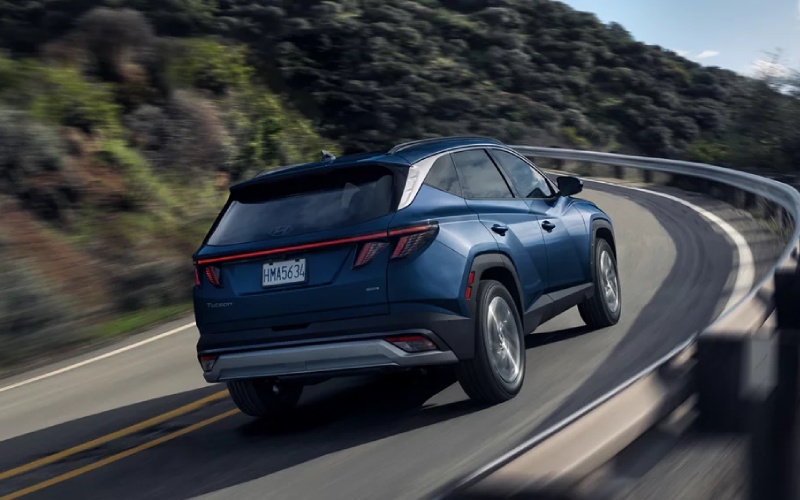
Hyundai of Grand Island – Is the 2026 Hyundai TUCSON a better family SUV than the 2026 Honda CR-V for Central City, NE drivers?
Family SUVs succeed when they reduce stress, keep everyone comfortable, and make every errand easier. If you are weighing the 2026 Hyundai TUCSON against the 2026 Honda CR-V around Central City, NE, the comparison often comes down to which model surrounds you with smarter everyday tech and confidence-inspiring features. Both are capable and well-built. The difference is how much value you place on visibility tech, cabin comfort, long-term ownership benefits, and powertrain flexibility.
Everyday Visibility and Parking Confidence
Backing out of angled spots on Highway 30 or easing into a tight driveway after a ballgame becomes far easier when the SUV shows you more. The TUCSON’s available Surround View Monitor creates a 360-degree bird’s-eye perspective to help you navigate curbs, low obstacles, and busy lots with calm precision. Honda’s camera coverage is clear, but the CR-V does not offer a 360-degree system. Add the TUCSON’s available Blind-Spot View Monitor that projects a live camera feed when you signal, and those small moments—crowded pickups, parallel parking on Main—become simpler and safer-feeling.
Comfort That Holds Up on Longer Drives
An SUV’s seats and climate features matter more than most shoppers realize. The TUCSON’s available ventilated front seats keep the cabin comfortable when the sun is high, while available heated rear outboard seats keep passengers content on the way home from late practices. The available panoramic sunroof brightens the interior for a more open, relaxed feel. CR-V passengers enjoy heated fronts and a pleasant, airy cabin, yet ventilated fronts and heated rears are not on the menu. After a week of commutes and weekend errands, those differences add up to a calmer family routine.
Powertrain Choices That Fit Real Life
Hyundai gives you three paths: a smooth gasoline 2.5-liter with an easygoing automatic transmission, an efficient Hybrid with confident response, and an available Plug-in Hybrid that can handle short hops on electric power before seamlessly switching to gas for longer drives. Honda delivers a solid gasoline engine and a responsive hybrid system. For families who want flexibility—especially if weekday miles are short and weekend miles are long—the TUCSON’s lineup simply adapts to more driving patterns without you needing to change habits.
Technology You Live With Daily
Both SUVs support wireless Apple CarPlay and Android Auto. Where the TUCSON widens the gap is how the rest of the tech suite ties together. Bluelink® and Bluelink+ connect your phone to the vehicle for remote starts, status checks, and more. The Panoramic Curved Display on select trims creates an elegant, easy-to-read hub. The CR-V counters with Google built-in on its top trim and standard wireless charging. That is strong, but Hyundai’s cohesive approach makes the interface feel built around your day, not just added to it.
Ownership Peace of Mind
America’s Best Warranty underscores Hyundai’s long-game commitment to customers. That matters for family budgeting and long-term confidence. Combined with the TUCSON’s robust safety suite—Forward Collision-Avoidance Assist, Lane Keeping Assist, Lane Following Assist, and more—you get a grounded sense of assurance that supports every trip from school drop-offs to weekend drives along the Platte River corridor.
Quick Decision Guide: What Do You Value Most?
- Parking and visibility: You want 360-degree camera coverage and camera-based blind-spot views for stress-free errands.
- Cabin comfort: Ventilated fronts, available heated rears, and a panoramic sunroof keep passengers happy year-round.
- Powertrain flexibility: Gas, Hybrid, and Plug-in Hybrid options let you tailor the TUCSON to how you actually drive.
- Connected ownership: Bluelink+ remote features help you manage life’s moving parts from your phone.
If those priorities align with your family’s needs, the 2026 Hyundai TUCSON edges ahead as the better family SUV.
How We Help Your Decision
Hyundai of Grand Island is happy to walk you through trims, features, and test drives that focus on your everyday routes. Our product specialists can show how the TUCSON’s visibility tech and comfort features reduce your weekday stress, and how HTRAC All Wheel Drive supports year-round confidence on county roads and open highways. You get transparent, practical guidance that respects your time and your priorities.
Frequently Asked Questions:
Does the 2026 Hyundai TUCSON have a 360-degree camera?
Yes. The available Surround View Monitor provides a 360-degree bird’s-eye view to help with parking, navigating curbs, and spotting low obstacles.
Can both SUVs connect my phone wirelessly?
Yes. Both the TUCSON and CR-V support wireless Apple CarPlay and Android Auto across the lineup.
Is all-wheel drive available on both?
Yes. The TUCSON offers available HTRAC All Wheel Drive, and the CR-V offers available Real Time AWD™ (standard on select hybrid trims).
Which one offers a Plug-in Hybrid?
The TUCSON offers an available Plug-in Hybrid. The CR-V does not offer a Plug-in Hybrid variant.
How about long-term peace of mind?
Hyundai backs the TUCSON with America’s Best Warranty, providing strong long-term coverage. That commitment reinforces everyday confidence for busy families.
For a family-focused compact SUV around Central City, the TUCSON’s blend of visibility tech, comfort features, and flexible powertrains often proves the smarter match. Our team—serving Hastings, St. Paul, and Central City—can set up back-to-back drives so you can feel the differences in the same afternoon.
Ready to take the next step? We can help you compare specific trims and features side-by-side so you get precisely what you want without the guesswork. Your decision will be grounded in real driving needs and a clear understanding of how each feature improves everyday life.
Request more 2026 Hyundai Tucson information
Which small SUV makes parking easier around St. Paul, NE — 2026 Hyundai KONA or 2026 Kia Seltos?
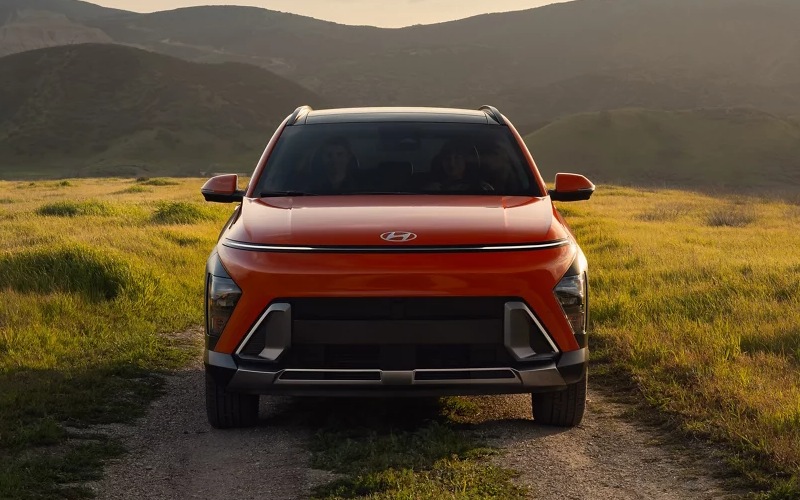
Hyundai of Grand Island – Which small SUV makes parking easier around St. Paul, NE — 2026 Hyundai KONA or 2026 Kia Seltos?
The 2026 Hyundai KONA makes parking easier, especially in the real-world mix of angled downtown spots, narrow alleys, and busy curb lanes you’ll find around St. Paul, NE. While both the KONA and the Seltos offer solid driver-assistance basics, Hyundai goes further with features that actively reduce the stress of tight maneuvers—like Remote Smart Parking Assist, Surround View Monitor, and Parking Distance Warning with Contour Warning on KONA Limited. Those tools stack on top of standard Smart Cruise Control with Stop & Go, Lane Following Assist, and other Hyundai SmartSense features that keep the rest of your drive relaxed and predictable.
The Seltos is a strong small SUV that brings available Highway Driving Assist, Rear Cross-Traffic Collision-Avoidance Assist, and convenient parking sensors, so it covers the fundamentals well. But it does not list a 360-degree camera system or a remote self-parking function. If your daily routine includes parallel parking by the library, squeezing into a spot outside a crowded café, or easing around taller vehicles that block sightlines, the KONA’s camera coverage and automated parking help you avoid the guesswork. It’s the difference between inching forward to check a curb and confidently parking on the first try.
What gives the KONA the edge for parking?
It comes down to visibility plus automation. The KONA Limited integrates a 360-degree bird’s-eye view, so you can see objects to the front, sides, and rear. Blind-Spot View Monitor adds a live camera feed when you signal, clarifying what’s in the next lane before you slide over. And if someone boxes you in, Remote Smart Parking Assist lets the KONA ease out of the spot while you watch—and stop it—using the key fob. Paired with Parking Distance Warning with Contour Warning, the system outlines obstacles on screen and tones become more insistent as you approach them. It all works together to make close-quarters driving less tense and more precise.
How does this help in everyday Nebraska driving?
Parking lots in smaller Nebraska towns can be compact, especially when pickups or SUVs tighten the space. The KONA’s Surround View Monitor gives you a clear look at those taller bumpers and trailer hitches, while the remote self-parking proves its worth if a vehicle parks too close to your doors. On winter days or windy afternoons, the fewer back-and-forth moves you need to make, the better—fewer inputs, fewer chances to bump a curb or misjudge a corner. The Seltos’ rear parking sensors are helpful, but they don’t replace the confidence of a full, stitched-together camera view around the car.
Feature-by-feature: parking tech comparison
- Surround view clarity: KONA Limited offers a 360-degree bird’s-eye camera; Seltos does not list a comparable 360-degree system.
- Remote self-parking: KONA Limited includes Remote Smart Parking Assist to move the vehicle into or out of a spot; Seltos does not list remote self-parking.
- Blind-spot video feed: KONA Limited adds Blind-Spot View Monitor with a live camera view in the cluster; Seltos offers Blind-Spot Collision Warning but not a live camera feed.
- Proximity guidance: KONA Limited provides Parking Distance Warning with Contour Warning for more precise, visual proximity cues; Seltos offers rear sensors and alerts.
Of course, there’s more to the drive than parking. Both SUVs offer available all-wheel drive for confidence on gravel cut-throughs and snowy mornings, and both can be had with an energetic 190-hp turbo engine. But even here, the KONA’s tuning and dual 12.3-inch display availability help it feel modern and intuitive. The standard 12.3-inch touchscreen across all KONA trims means your first test drive already feels familiar, while the available 12.3-inch digital instrument cluster makes checking speed and driver-assistance status almost second nature.
Which trims should shoppers consider for the best parking tech?
In the KONA lineup, the Limited trim delivers the full suite: Surround View Monitor, Remote Smart Parking Assist, Highway Driving Assist, Blind-Spot View Monitor, and Parking Distance Warning with Contour Warning. If you want the most comprehensive parking and visibility package, that’s your target. In the Seltos lineup, the SX offers helpful upgrades like Highway Driving Assist and Smart Cruise Control w/ Stop & Go, but it doesn’t add a 360-degree camera or remote self-parking. If your driving is mostly open roads with occasional parallel parking, those features may be enough. If you park in tight spaces frequently, the KONA’s added tools pay off every day.
Frequently Asked Questions:
Does the 2026 Hyundai KONA offer Remote Smart Parking Assist?
Yes. Remote Smart Parking Assist is included on KONA Limited, allowing you to maneuver into or out of a parking space using the key fob while you monitor from outside the vehicle.
Does the 2026 Kia Seltos have a 360-degree camera system?
The Seltos lists helpful camera and sensor features, but it does not list a 360-degree Surround View Monitor among its available features for 2026.
Which trims have the 190-hp turbo engine?
For the KONA, the available 190-hp 1.6L turbo is offered on SEL Premium and Limited. For the Seltos, the available 190-hp 1.6L turbo is on SX.
If you’re comparing these two with parking ease at the top of your list, the KONA’s added visibility and automation are the deciding factors. Take a close look at KONA Limited if you want every parking and proximity tool Hyundai currently offers on this model.
Hyundai of Grand Island is happy to walk you through these features side by side so you can feel the difference in your own daily routine. Our product specialists will help you pick the configuration that fits your routes and your parking realities, whether that’s downtown parallel spots, tight apartment lots, or narrow worksite curbs.
For shoppers across the Tri-Cities, we’re Hyundai of Grand Island, serving Hastings, St. Paul, and Central City. When you’re ready, schedule a drive and see how the KONA’s parking tech simplifies the parts of driving most drivers find stressful.
Request more 2026 Hyundai KONA information
Is the 2026 Hyundai SANTA FE safer and more tech-friendly than the 2026 Honda Passport for Central City, NE families?
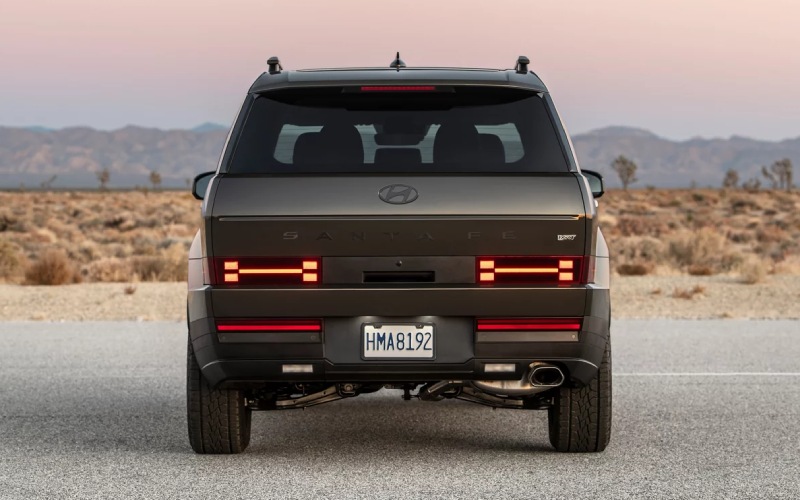
Hyundai of Grand Island – Is the 2026 Hyundai SANTA FE safer and more tech-friendly than the 2026 Honda Passport for Central City, NE families?
Comparing family SUVs can feel like splitting hairs until you look at the features you’ll use every single day. For many Central City, NE families, the right answer often comes down to visibility, driver assistance, and flexible seating. In those areas, the 2026 Hyundai SANTA FE builds a lead with available three-row seating, a wide set of Hyundai SmartSense features, and everyday conveniences such as a Full-Display Digital Rearview Mirror and Remote Smart Parking Assist. The 2026 Honda Passport is capable and newly rugged in TrailSport trims, but it remains a two-row SUV and does not offer a hybrid powertrain or Hyundai’s camera-based Blind-Spot View Monitor. That matters when you’re handling carpool duty, backing into busy lots, or traveling long stretches of US-281.
Let’s break down what this means for real life. SANTA FE’s visibility tech reduces stress when the cargo area is full or your view is compromised by passengers and gear. The Full-Display Digital Rearview Mirror serves a live video feed from the rear, and on Limited and Calligraphy trims, you can add the Surround View Monitor to get a 360-degree bird’s-eye view around the vehicle. Remote Smart Parking Assist takes the edge off tight spots by moving the vehicle in or out of a space while you stand outside and guide it with the key. Passport’s available TrailWatch provides multiple camera views off-road, which is useful on narrow trails, but it doesn’t replace Hyundai’s 360-degree parking view or the digital rearview mirror for day-to-day errands and school runs.
Key safety and assistance differences
Every SANTA FE includes robust Hyundai SmartSense features such as Lane Following Assist, Lane Keeping Assist, and Forward Collision-Avoidance Assist with Pedestrian, Cyclist, and Junction Turning Detection. Highway Driving Assist is standard on XRT and Limited, and Highway Driving Assist 2 is standard on Calligraphy to help center the vehicle and assist with lane changes. Passport’s Honda Sensing suite covers core functionality like adaptive cruise control and lane keeping, but Hyundai’s advanced options, presentation on large 12.3-inch displays, and camera-based extras like Blind-Spot View Monitor give SANTA FE an everyday edge for families who value clear information at a glance.
It’s also worth noting the powertrain conversation. SANTA FE offers both a strong 2.5L Turbo engine and a 231-hp combined-output hybrid that you don’t have to plug in. If your week includes regular commutes and weekend activities, the hybrid’s smooth low-end response and reduced fuel stops can be a real quality-of-life upgrade. Passport focuses on a single gas powertrain; it’s tough and trail-ready, but it doesn’t give you the same flexibility. For many households who split time between errands in Central City and longer trips to events across the region, having that hybrid option is meaningful.
How this plays out on Central City, NE roads
Families here navigate a mix of wide-open highways, town streets, and stretches of gravel where crosswinds can pick up. SANTA FE’s available HTRAC All Wheel Drive manages torque proactively, keeping the vehicle settled on gusty days or when you transition from pavement to a dusty lane. When it’s time to back into a space near the ball fields or a crowded main street angle spot, Surround View Monitor and Remote Smart Parking Assist become confidence multipliers. Passport’s i-VTM4 system is solid, particularly on uneven terrain, but it doesn’t pair with the same level of camera-backed parking and visibility tech that makes weekday life easier.
What about towing and capacity?
Both SUVs can tow when properly equipped—SANTA FE offers up to 4,500 pounds and Passport offers strong ratings as well. If towing is a frequent need, think about the full picture: camera-based visibility, trailer approach angles, and how easy it is to line up in tight areas. SANTA FE’s camera suite and Remote Smart Parking Assist can make that routine less stressful, especially if you’re solo and need to nudge into place without a spotter.
Frequently Asked Questions:
Does SANTA FE have a third row while Passport does not?
Yes. SANTA FE includes three-row seating on every trim, with available captain’s chairs for the second row. Passport is a two-row SUV.
Can I get a hybrid powertrain on Passport like SANTA FE?
No. SANTA FE offers a 231-hp combined-output hybrid. Passport does not offer a hybrid powertrain.
Which SUV offers a digital rearview mirror and a 360-degree camera?
SANTA FE offers both the Full-Display Digital Rearview Mirror and Surround View Monitor on upper trims. Passport provides TrailWatch camera views for off-road, but not the same 360-degree parking view or the digital rearview mirror.
Is Highway Driving Assist available on both?
Highway Driving Assist is available on SANTA FE (HDA standard on XRT and Limited; HDA 2 standard on Calligraphy). Passport uses Honda Sensing with lane keeping and adaptive cruise, but it does not offer Hyundai’s HDA/HDA 2.
Who can help me choose the right SANTA FE for my family?
Hyundai of Grand Island can walk you through trims and features, including HTRAC All Wheel Drive, camera systems, and the hybrid powertrain. Our team is serving Hastings, St. Paul, and Central City with friendly, informed guidance tailored to local driving.
Bottom line: If you want a family SUV that reduces daily stress with advanced visibility, assistance, and seating flexibility, SANTA FE is the better fit for most Central City, NE households. Passport is tough, but SANTA FE’s safety tech and everyday convenience features create an environment where drivers feel supported from the driver’s seat to the third row.
Request more 2026 Hyundai Santa Fe information
Connect with us


Hyundai of Grand Island

Address
3312 West Stolley Park Road
Grand Island, NE 68803
Phone
- Sales 308-318-3282308-318-3606
- Service 308-318-3848
- Parts 308-318-4342
| Monday | 8:00AM - 7:00PM |
| Tuesday | 8:00AM - 7:00PM |
| Wednesday | 8:00AM - 7:00PM |
| Thursday | 8:00AM - 7:00PM |
| Friday | 8:00AM - 7:00PM |
| Saturday | 8:00AM - 6:00PM |
| Sunday | Closed |
| Monday | 7:30AM - 6:00PM |
| Tuesday | 7:30AM - 6:00PM |
| Wednesday | 7:30AM - 6:00PM |
| Thursday | 7:30AM - 6:00PM |
| Friday | 7:30AM - 6:00PM |
| Saturday | Closed |
| Sunday | Closed |
| Monday | 8:00AM - 5:00PM |
| Tuesday | 8:00AM - 5:00PM |
| Wednesday | 8:00AM - 5:00PM |
| Thursday | 8:00AM - 5:00PM |
| Friday | 8:00AM - 5:00PM |
| Saturday | Closed |
| Sunday | Closed |