



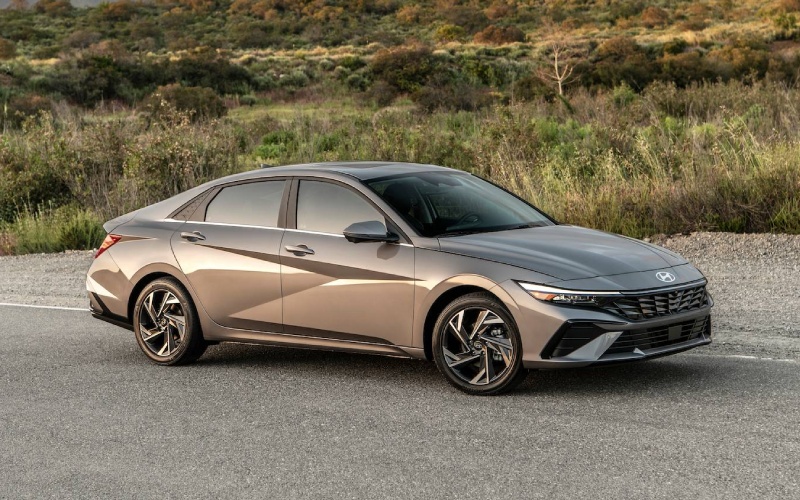
Hyundai of Grand Island – Highway Driving Assist and Everyday Confidence in the 2026 Hyundai ELANTRA for Doniphan, NE Commuters
Driving from Doniphan to Grand Island can be a short hop or a longer highway run, depending on the day. The 2026 Hyundai ELANTRA brings a suite of driver-assist features and intuitive displays that are genuinely helpful on US-281, Highway 34, or while merging near I-80. In this blog, we will break down the systems that give you a more relaxed drive—Highway Driving Assist, Smart Cruise Control with Stop & Go, Lane Following Assist, and more—plus the display tech that keeps your information clear without distraction.
Why driver assistance stands out for Doniphan, NE driving
Local roads around Doniphan can vary—steady-speed highway stretches, two-lane segments with light traffic, and quick sprints through town. In that mix, features like Lane Following Assist and Highway Driving Assist earn their keep. They are not about replacing the driver; they are about easing the little tasks that add up, helping you maintain lane centering, distance, and a calm pace when the route turns routine. Paired with ELANTRA’s available dual 10.25-inch displays, you get a clean view of your speed, set distance, and navigation prompts so you can anticipate the next turn or exit well ahead of time.
Hyundai built these systems to be approachable: clear icons, simple steering-wheel controls, and audible/visual prompts that are informative without being overwhelming. The result is a sedan that feels “on your side,” whether you are rolling along US-281 at a steady clip or heading into Grand Island for dinner and errands.
Key ELANTRA features that make commuting easier
- Highway Driving Assist: Helps maintain a set speed, following distance, and lane centering on controlled-access roads—standard on Limited.
- Smart Cruise Control: Available with Stop & Go to automatically slow and resume with traffic on properly marked roads.
- Lane Keeping & Following: Standard LKA and LFA provide steering support to help keep you in your lane and centered.
- Blind-Spot Alerts: Standard BCW gives timely warnings when a vehicle is in your blind spot area as you signal to change lanes.
- Rear Cross-Traffic Assist: Standard RCCA provides audio/visual cues—and can brake—when it detects vehicles crossing behind you.
- High Beam Assist: Standard HBA can toggle your high beams when it detects oncoming traffic at night.
The above systems form a helpful foundation for daily driving and quick trips. If you choose the Limited trim, Highway Driving Assist layers in a more comprehensive highway companion, while SEL Sport Premium adds Smart Cruise Control with Stop & Go, so heavy traffic feels less tedious. No matter the trim, ELANTRA’s standard safety roster is impressively generous for the segment.
Displays that keep you informed at a glance
The ELANTRA’s available dual 10.25-inch displays are a quiet but notable upgrade for drivers who care about clarity. Hyundai pairs a hi-res touchscreen with navigation next to a 10.25-inch fully digital cluster for a near-seamless panel. On commutes north toward Grand Island, that means your turn-by-turn directions and driver-assist icons live right where you want them—front and center—so you can check your set speed, following distance, and next turn without bouncing between screens.
If you prefer simplicity, the standard 8-inch screen with wireless Android Auto and Apple CarPlay keeps your apps in easy reach, and the interface remains straightforward. Either way, the presentation is tidy, responsive, and confident at highway speeds.
Everyday tech that elevates the drive
- Bluelink+ Convenience: Available Bluelink+ lets you remotely start, lock/unlock, and more from your smartphone.
- Wireless Charging: An available Qi-compatible pad reduces cord clutter on busy days.
- Premium Sound: Available Bose® Premium Audio makes podcasts and playlists pop.
- Digital Key: Hyundai Digital Key 2 Touch (available) can simplify key sharing with compatible smartphones.
These features do not just check a box; they add small efficiencies that compound over weeks of commuting. Remote-starting to pre-condition the cabin, charging your phone without cables, and using navigation that shows clearly on a broad display all lead to a more refined daily routine. And if you opt for the ELANTRA N Line, the 201-hp 1.6L Turbo with a 7-speed DCT brings a nice bump in responsiveness for passing on open stretches.
Tips for trying driver assistance on a test drive
- Start Simple: On a low-traffic road, engage Smart Cruise Control to feel how it maintains distance and speed.
- Watch the Cluster: With the digital display, note the icons for lane centering and following distance as they activate.
- Check Lane Support: Lightly relax steering input and feel the gentle cues from LKA and LFA on clearly marked roads.
- Practice Exits: Use navigation guidance and watch the cluster change to upcoming-turn prompts to see how early it cues you.
Using these features in a controlled way builds trust, which is ultimately what makes the daily Doniphan-to-Grand Island route feel calmer. The systems are easy to tailor—adjust following distance, change alert volumes, or switch modes—so you can find the settings that fit your style.
Frequently Asked Questions:
Does Highway Driving Assist steer the car by itself?
No. Highway Driving Assist helps with lane centering, set speed, and following distance on compatible highways, but you must keep your hands on the wheel and remain engaged at all times.
What is the difference between Smart Cruise Control and Highway Driving Assist?
Smart Cruise Control with Stop & Go helps you maintain speed and distance, including stop-and-go capability. Highway Driving Assist adds lane-centering support and enhanced highway functionality. Both are assistance features—not autonomous driving.
Can I use driver assistance on any road?
Features like Lane Following Assist and Lane Keeping Assist work best on clearly marked roads. Highway Driving Assist is intended for controlled-access highways. Always follow the Owner’s Manual and use features only where appropriate.
Do I need the 10.25-inch display to use these systems?
No. Driver-assist systems work across trims, and status information shows on your instrument cluster. The available dual 10.25-inch setup simply provides a broader, more unified view for navigation and system icons.
Does Hyundai Digital Key 2 Touch replace a traditional key?
It can complement your key by allowing compatible smartphones to lock, unlock, and start the vehicle. You can still use a traditional key fob, and Digital Key 2 Touch adds flexible access options.
The best way to see how these features come together is to schedule a test drive. The systems are approachable, the screens are crisp, and the cabin feels thoughtfully arranged—ideal for the mix of highways and town streets that define Doniphan driving. If you want help exploring trims and options, Hyundai of Grand Island can walk you through SEL Sport Premium, Limited, hybrid choices, and the N Line so you match features to your commute with confidence.
We are serving Ravenna, Doniphan, and Wood River with a streamlined test-drive and purchasing experience designed to make your research easier and your next steps simple.
Request more 2026 Hyundai Elantra information
Connect with us


Hyundai of Grand Island

Address
3312 West Stolley Park Road
Grand Island, NE 68803
Phone
- Sales 308-318-3282308-318-3606
- Service 308-318-3848
- Parts 308-318-4342
| Monday | 8:00AM - 7:00PM |
| Tuesday | 8:00AM - 7:00PM |
| Wednesday | 8:00AM - 7:00PM |
| Thursday | 8:00AM - 7:00PM |
| Friday | 8:00AM - 7:00PM |
| Saturday | 8:00AM - 6:00PM |
| Sunday | Closed |
| Monday | 7:30AM - 6:00PM |
| Tuesday | 7:30AM - 6:00PM |
| Wednesday | 7:30AM - 6:00PM |
| Thursday | 7:30AM - 6:00PM |
| Friday | 7:30AM - 6:00PM |
| Saturday | Closed |
| Sunday | Closed |
| Monday | 8:00AM - 5:00PM |
| Tuesday | 8:00AM - 5:00PM |
| Wednesday | 8:00AM - 5:00PM |
| Thursday | 8:00AM - 5:00PM |
| Friday | 8:00AM - 5:00PM |
| Saturday | Closed |
| Sunday | Closed |