



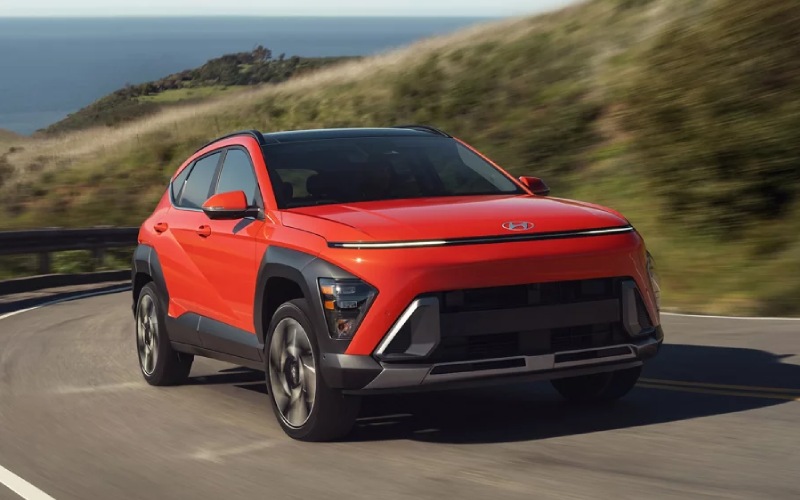
Hyundai of Grand Island – Can I remote start and lock the 2026 Hyundai KONA from my phone near Aurora, NE?
If you want the convenience of starting, locking, and checking your SUV from your phone, the 2026 Hyundai KONA makes it straightforward. With Bluelink+ included and, on select trims, Hyundai Digital Key 2 Touch, you can handle day-to-day tasks—like warming up before an early US-34 commute or confirming you locked up after a late stop on 12th Street—without hunting for your key fob. At Hyundai of Grand Island, we help Aurora, NE shoppers set this up the right way so it works smoothly from day one.
Why phone-based access matters around Aurora, NE
Life in and around Aurora can mean split schedules—school drop-offs in Hampton, quick runs to Main Street Market, and I-80 hops to Grand Island. Being able to start the KONA remotely, set the cabin to a comfortable temperature, and confirm doors are locked from your phone adds real convenience. It’s also peace of mind in bigger lots—like near the fairgrounds or popular weekend dining spots—where a quick “lock” confirmation or vehicle locator can save time and worry.
What you can do from your phone with Bluelink+
Bluelink+ is Hyundai’s connected car service, and on the 2026 KONA it’s included at no extra cost. Once enrolled, the Bluelink+ features accessed through the MyHyundai app let you control and monitor core functions even when you are not near the vehicle.
- Remote engine start with climate presets
- Lock and unlock doors
- Find your KONA on a map and flash lights or honk if needed
- Check fuel level and other status indicators
- Receive alerts and set custom notifications
For everyday use, remote start and lock/unlock are the headliners. If your KONA is equipped with dual automatic temperature control (standard on SEL Sport and up), you can precondition the cabin more precisely. On trims without auto climate, remote start typically uses your last climate settings.
What does it cost?
Bluelink+ on the 2026 KONA is provided at no extra cost to you. That means the remote start, remote lock/unlock, vehicle status, and more are available without a separate subscription fee. Your smartphone’s normal data charges from your carrier apply, but the KONA’s connected services access is included. For shoppers near Aurora, NE who want this level of convenience without adding ongoing app fees, this is a major ownership advantage.
Trim and equipment basics for phone-based control
Every 2026 KONA is Bluelink+ capable. Here are the key feature differences that matter when you want to control the SUV from your phone or carry your phone as your key:
- Proximity Key with push button start and remote start: Listed across KONA trims, enabling quick starts from the key fob when you are nearby and supporting app-based remote start via Bluelink+.
- Dual automatic temperature control: Standard on SEL Sport and higher, allows remote start to use temperature presets in the app for targeted preconditioning.
- Hyundai Digital Key 2 Touch: Standard on KONA Limited. With a compatible smartphone, you can unlock and start without the key fob by tapping your phone—plus share access digitally with family.
If you are comparing trims at our store, think of it this way: Bluelink+ gives every KONA app-based remote control. Moving up trims adds climate precision and, on Limited, phone-as-key capability through Hyundai Digital Key 2 Touch.
How to set up remote start and lock/unlock on your phone
We will walk you through this at Hyundai of Grand Island, but here is the basic flow if you like to prep at home:
- Download the MyHyundai app and create or sign in to your account.
- Add your 2026 KONA by VIN and complete owner verification.
- Enable Bluelink+ services and accept permissions.
- In Vehicle Settings, review remote start preferences and climate options (if equipped).
- Set up app security—PIN or biometric—for quick, secure access.
- Test remote lock/unlock and a short remote start from your driveway.
If you prefer a quick, guided setup, our team will enroll your KONA, confirm everything works, and show you how to customize climate presets and notifications before you drive home.
Phone-as-remote vs. phone-as-key—what’s the difference?
This is a common point of confusion. The MyHyundai app with Bluelink+ turns your phone into a remote control for your KONA—lock/unlock, start/stop, and vehicle info—even when you are not near the car. Hyundai Digital Key 2 Touch, available on KONA Limited, can turn your compatible smartphone into the actual key. You tap your phone to unlock and then start the engine—no key fob needed. You can also share a Digital Key with family or friends by sending it to their compatible Android™, Google, or Apple® devices, and you can revoke access any time.
In short: Bluelink+ is remote control via the cloud. Digital Key 2 Touch is phone-as-key you can carry and share.
Security and privacy confidence
Hyundai builds multiple safeguards into both systems. App commands require account verification and a PIN or biometric. Digital keys can be shared and revoked, and access is device-specific and encrypted. If your phone is lost, you can immediately disable app access and revoke any Digital Keys from another device or by contacting us for support. And because the KONA keeps its own secure connection, your remote commands work even if the car is parked several blocks away on Q Street or at a trailhead outside Aurora—so long as both your phone and the KONA have network connectivity.
Local tips from our team
In our part of Nebraska, coverage can vary as you get outside Aurora toward Giltner or Phillips. The MyHyundai app will queue commands if service is spotty, but for the most dependable experience, we recommend testing remote functions at the places you visit most—home, work, and common parking spots. If you plan to rely on Hyundai Digital Key 2 Touch daily, keep the key fob tucked in a bag for backup, especially on longer trips across the I-80 corridor. We are happy to show you how to add a backup key card and how to share and revoke keys for visiting family.
Whether you choose KONA SE, SEL Sport, SEL Premium, or Limited, our product specialists can demonstrate remote features on-site, tailor your climate presets, and help you decide if the added convenience of Hyundai Digital Key 2 Touch on the Limited fits your routine.
Frequently Asked Questions:
Do I need a subscription to use remote start and lock/unlock on the 2026 KONA?
No. Bluelink+ is included on the 2026 KONA at no extra cost, so app-based remote start, lock/unlock, vehicle status, and more are available without a separate subscription fee.
Will remote start precondition the cabin and seats?
Yes, you can use the app to precondition the cabin. If your KONA has dual automatic temperature control (standard on SEL Sport and up), you can set target temperatures. Heated front seats are available on multiple trims and heated and ventilated front seats are standard on Limited; when equipped, climate presets can help the KONA warm or cool more effectively during remote start.
What is the difference between Bluelink+ and Hyundai Digital Key 2 Touch on KONA?
Bluelink+ lets you control the SUV remotely using the MyHyundai app—think remote start, lock/unlock, and vehicle status. Hyundai Digital Key 2 Touch, standard on KONA Limited, lets your compatible smartphone serve as the key to unlock and start the vehicle by touch, and you can share that key digitally.
Will this work everywhere I drive around Aurora, NE?
Bluelink+ app commands work wherever both your phone and your KONA have network connectivity. Around Aurora and Grand Island, that’s typically reliable, though rural stretches can vary. If a command fails due to coverage, try again when your signal improves.
What if my phone battery dies?
You still have your key fob. If you rely on Digital Key 2 Touch on KONA Limited, we recommend carrying the fob or a backup key card for peace of mind on longer drives.
Can I share vehicle access with family members?
Yes. You can sign into the MyHyundai app on additional devices for Bluelink+ controls. With Digital Key 2 Touch on KONA Limited, you can also share a digital key with family by sending it to their compatible Android™, Google, or Apple® devices and revoke it any time.
Our team at Hyundai of Grand Island will gladly set up your MyHyundai account, walk you through Bluelink+ and Hyundai Digital Key 2 Touch on the 2026 KONA, and answer questions specific to your daily routes around Aurora, NE. Stop by and we will make sure your phone and your KONA work together from day one—so your drive is easier every day.
Request more 2026 Hyundai KONA information
Connect with us


Hyundai of Grand Island
Address
3312 West Stolley Park Road
Grand Island, NE 68803
Phone
- Sales 308-318-3282308-318-3606
- Service 308-318-3848
- Parts 308-318-4342
| Monday | 8:00AM - 7:00PM |
| Tuesday | 8:00AM - 7:00PM |
| Wednesday | 8:00AM - 7:00PM |
| Thursday | 8:00AM - 7:00PM |
| Friday | 8:00AM - 7:00PM |
| Saturday | 8:00AM - 6:00PM |
| Sunday | Closed |
| Monday | 7:30AM - 6:00PM |
| Tuesday | 7:30AM - 6:00PM |
| Wednesday | 7:30AM - 6:00PM |
| Thursday | 7:30AM - 6:00PM |
| Friday | 7:30AM - 6:00PM |
| Saturday | Closed |
| Sunday | Closed |
| Monday | 8:00AM - 5:00PM |
| Tuesday | 8:00AM - 5:00PM |
| Wednesday | 8:00AM - 5:00PM |
| Thursday | 8:00AM - 5:00PM |
| Friday | 8:00AM - 5:00PM |
| Saturday | Closed |
| Sunday | Closed |