



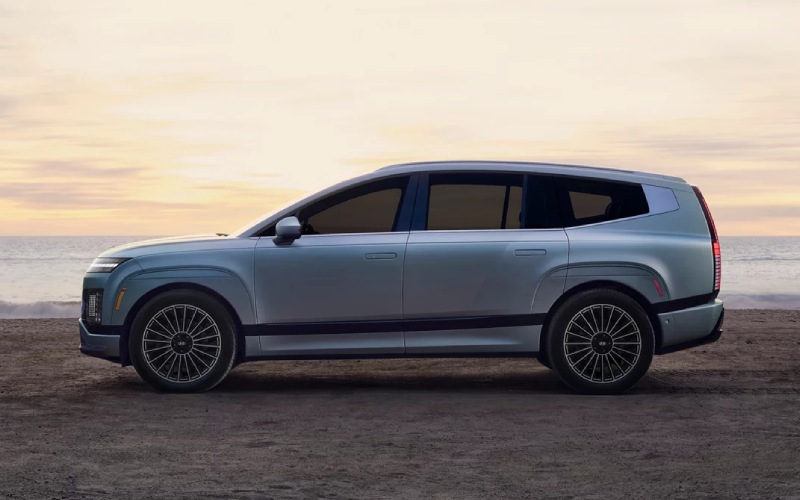
Hyundai of Grand Island – Which three-row electric SUV charges more consistently for family trips around Central City, NE: the 2026 Hyundai IONIQ 9 or 2026 Kia EV9?
Charging speed grabs headlines, but charging consistency is what makes family road trips easier. When shoppers compare the 2026 Hyundai IONIQ 9 and the 2026 Kia EV9, both SUVs promise ultra-fast DC capability, yet the question parents ask us most is which model will deliver predictably short stops across different stations and weather. The EV9 publishes impressive metrics — on a 350 kW DC fast charger, Kia estimates a 10 to 80 percent session in as little as 24 minutes, and the 2026 model includes a built-in NACS port for broad access to public fast chargers. The IONIQ 9 arrives as Hyundai’s first-ever three-row IONIQ, expanding the brand’s proven ultra-fast charging approach from IONIQ 5 and IONIQ 6 to an even roomier package designed for families. That heritage matters because charge curves — how quickly and how long a vehicle can hold a strong rate — are as important as peak numbers on a website.
From a planning perspective, consistency depends on thermal management, preconditioning, and how the vehicle communicates real-time information. Hyundai’s IONIQ family has emphasized clear, driver-friendly displays and simple route planning that accounts for weather and remaining range, and we expect the IONIQ 9 to carry this approach forward. The EV9 counters with strong charging hardware and intuitive screens that make it easy to find and navigate to stations. For busy parents, both SUVs offer what you need — but Hyundai’s long-standing focus on predictable, repeatable charging sessions is a quiet advantage during the second or third stop of a long day. That is when an efficient aero profile, polished thermal strategies, and easy in-cabin confirmations lower stress while kids settle in with snacks and music.
- Peak rate vs. sustained rate: Peak numbers look great, but sustained speed across the mid-pack of the battery is what shortens real-world stops.
- Battery preconditioning: Warming the pack before you arrive at a fast charger can help you hit higher rates sooner in cold weather.
- Thermal management: Smart cooling at highway speeds helps the system accept charge more consistently on back-to-back sessions.
- Navigation integration: Built-in route planning that factors charger types and stops reduces guesswork on unfamiliar routes.
- User feedback: Clear on-screen estimates for time-to-continue and state-of-charge help you make confident choices under time pressure.
How does this translate to everyday life around schools, practices, and weekend getaways? The IONIQ 9’s expanded “third space” cabin gives your family the room to unwind during short charging breaks, and Hyundai’s intuitive software makes it simple to verify you are on pace to depart on time. The EV9 also delivers family-friendly space and accessible charging, and Kia’s move to a native NACS port broadens options across a growing network. Ultimately, the IONIQ 9’s consistent, user-centered charging philosophy — refined through the IONIQ lineup — gives it an everyday edge for parents who value fewer surprises and better predictability between fast chargers.
At Hyundai of Grand Island, we help families set up home charging, understand DC fast-charging etiquette, and learn how preconditioning and route planning can shave minutes off each stop. Our product specialists will walk you through the key differences between these two three-row EVs and set up a drive to preview the IONIQ 9’s quiet ride and confident passing power. For families planning regular trips across the Platte River corridor, charging confidence is a real benefit you feel every time you plug in.
Frequently Asked Questions:
Will the IONIQ 9 support ultra-fast charging like other IONIQ models?
The IONIQ 9 is built on Hyundai’s proven EV know-how from IONIQ 5 and IONIQ 6, which are among the fastest-charging EVs in their segments. The IONIQ 9 is designed to extend that ultra-fast capability to a three-row format.
What makes charging consistency better in real life?
Consistent fast charging relies on smart thermal management, effective battery preconditioning before you arrive, and clear driver information that helps you decide when to unplug and go. Hyundai’s interface makes those steps straightforward for everyday use.
Can I plan family road trips using built-in navigation?
Yes. Both the IONIQ 9 and EV9 integrate charging stops into route planning. Hyundai’s approach emphasizes easy-to-read time-to-continue estimates and charger type filters, which families find helpful when schedules are tight.
Visit us for a personalized demo — Hyundai of Grand Island is serving Hastings, St. Paul, and Central City with knowledgeable EV guidance, from charger selection to road-trip planning tailored to your routes.
Request more 2026 Hyundai IONIQ 9 information
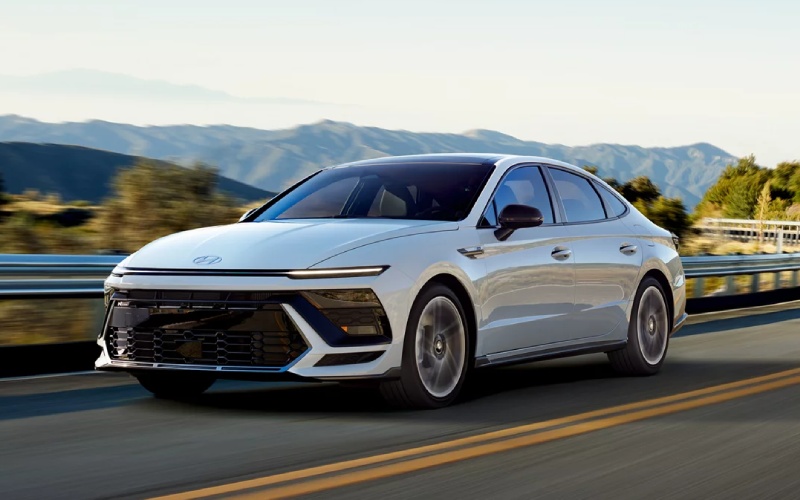
Hyundai of Grand Island – Panoramic Curved Display Tips on the 2026 Hyundai Sonata for Central City, NE Drivers
The 2026 Hyundai Sonata’s panoramic curved display elevates every mile with a sleek, driver-focused interface that pairs a 12.3-inch touchscreen and an available 12.3-inch digital instrument cluster into one sweeping view. For daily driving around Central City, NE, this single sightline streamlines glance time, helps reduce distraction, and puts your most-used features in clear reach. Whether you prioritize Wireless Apple CarPlay® and Android Auto™, Bluelink+ remote features, or on-road guidance, the display brings it all together with a clean, modern aesthetic that complements the Sonata’s ultramodern cabin design. If you prefer the athletic character of N Line or the serene efficiency of Sonata Hybrid, your key infotainment touchpoints remain intuitive and consistent, which makes switching trims seamless for households sharing the vehicle.
Dialing in the panoramic curved display for daily commuting is straightforward and rewarding. Start by choosing your home screen layout to put navigation, audio, and real-time driving data up front. The available 12.3-inch digital cluster can be configured to prioritize the metrics you value—whether that is a calm, minimalist view for relaxed travel or a performance-forward layout that highlights tachometer and drive mode in N Line. When you add premium touches like available Bose® Premium Audio with 12 speakers, your display becomes the control center for crisp, balanced sound. And if your routine includes winter mornings and quick departures, pairing your phone through Hyundai Digital Key 2 Premium sets the stage for a faster, more connected start to the day.
- Customize quick access: Create shortcuts to favorite apps, driver-assistance settings, and frequently used functions so you are one tap from the features you use most.
- Optimize cluster views: Choose information density and themes that match your focus—efficiency tracking for Sonata Hybrid or performance emphasis for N Line.
- Leverage voice commands: Use natural-language prompts to adjust climate, set navigation, or change music without taking your hands off the wheel.
- Use profiles for multiple drivers: Save individual preferences for display layout, audio balance, and connectivity, ideal for shared vehicles.
- Keep software current: Take advantage of available OTA updates to ensure maps and infotainment stay fresh and responsive.
Drivers who spend a lot of time on Highway 30 or shuttle between neighborhoods will appreciate how the panoramic curved display aligns with Hyundai SmartSense assistance. Features like Smart Cruise Control with Stop & Go and Lane Following Assist work in concert with your screens to present timely alerts and lane information. The benefit is not just safety—it is reduced cognitive load. Clear visuals and crisp graphics help you digest information quickly, which is particularly helpful when navigating unfamiliar areas or reacting to changing traffic. Pair that with Bluelink+, and you can handle remote start, lock and unlock, and vehicle status checks from a compatible smartphone, so your Sonata is ready before you even open the door.
Wireless Apple CarPlay® and Android Auto™ complete the experience by keeping your digital life integrated without clutter. For many Central City, NE families, fewer cables means easier handoffs between drivers and a cleaner organization for daily errands. Set your favorite podcast, keep your group chats audible with minimal distraction, and let turn-by-turn guidance float on the display with the clarity it deserves. If you choose Sonata Hybrid, the same interface surfaces efficiency readouts that make it simple to maximize range through gentle throttle and smart regenerative braking. If you choose N Line, your preferred drive mode and shift cues are never buried—just a glance away.
For buyers evaluating trims, don’t overlook how central this display feels during ownership. It is not just about screen size; it is the way the Sonata harmonizes the cabin experience around one elegant arc. Hyundai of Grand Island can help you compare layouts and features in person and show how easy it is to set up profiles, pair phones, and tailor the driving environment for your schedule. With an approachable learning curve and room for deeper personalization, the panoramic curved display meets you where you are—then grows with you as your needs change.
Frequently Asked Questions:
Does the 2026 Hyundai Sonata require cables for smartphone integration?
No. The Sonata supports Wireless Apple CarPlay® and Android Auto™, so you can connect without plugging in.
Can I get navigation prompts in the cluster as well as the touchscreen?
On models with the available 12.3-inch digital cluster, select layouts can show guidance cues for at-a-glance clarity.
How do updates work for the display?
With available OTA updates, your Sonata can receive the latest map and multimedia software, helping keep features current.
Is the display easy to use for multiple drivers?
Yes. Create driver profiles to store individual preferences for layout, audio, and connectivity for quick, consistent handoffs.
For shoppers comparing trims and tech, our team—serving Hastings, St. Paul, and Central City—can demonstrate everything from cluster customization to voice controls, so you leave confident in your setup.
Request more 2026 Hyundai Sonata information
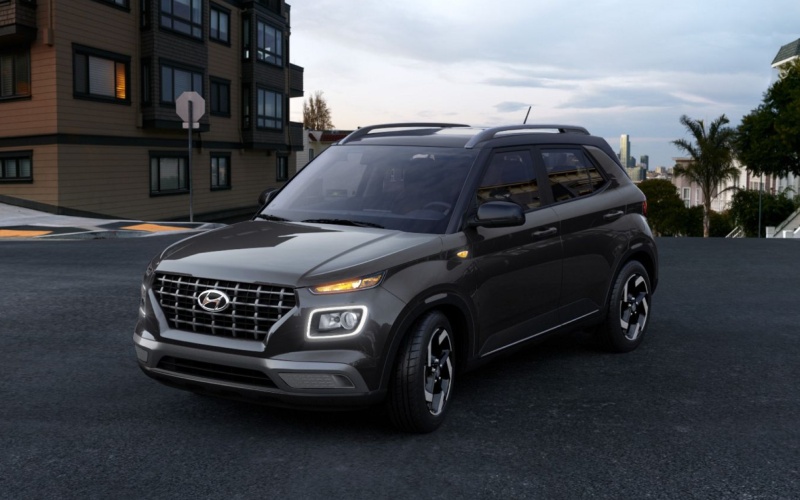
Hyundai of Grand Island – Snow Mode Confidence with the 2026 Hyundai Venue for St. Paul, NE Winter Drives
When cold fronts sweep across the Platte River Valley, slick side streets and wind-polished intersections can turn routine drives into cautious crawls. That’s where the 2026 Hyundai Venue’s available Drive Mode Select with Snow Mode earns its keep for St. Paul, NE drivers. While Venue is a front-wheel drive specialist, Snow Mode adjusts throttle mapping and traction control logic to help you get moving with smoother, more controlled power delivery on low-grip surfaces. It’s an elegant way to make the most of the tires you already have—especially when paired with good winter rubber—so you feel composed pulling away from stop signs, easing through neighborhood turns, and negotiating unplowed parking lots.
Snow Mode does its best work by optimizing what your Venue already brings to the table: a light, agile chassis and smart powertrain calibration. Rather than simply capping power, it refines how the engine responds to your right foot, reducing wheelspin and helping you build traction gradually. The feature also dials in stability control interventions to keep you pointed straight, especially helpful on crowned two-lanes when slush collects near the curb. In real life, this means fewer abrupt inputs and more consistent progress—exactly what you want on mornings when the plows are still catching up.
Beyond winter traction, the 2026 VENUE’s everyday tech adds clarity and calm in cold weather. Every trim includes wireless Apple CarPlay® and Android Auto™, so your navigation, podcasts, and calls are seamless even with gloves on and pockets zipped. SEL models bring heated front seats to warm your core faster, while the power tilt-and-slide sunroof can still brighten the cabin on clear, cold days. Hyundai SmartSense driver assists—like Forward Collision-Avoidance Assist with Pedestrian Detection, Lane Keeping Assist, Driver Attention Warning, and High Beam Assist—work in the background to support alert, confident driving when visibility is unpredictable. Add Blind-Spot Collision Warning and Rear Cross-Traffic Collision Warning on SEL, and you have a small SUV that feels bigger than its footprint when conditions close in.
For many drivers in and around St. Paul, Snow Mode fits a realistic winter strategy: choose the right tires, start smoothly, keep momentum predictably, and let the Venue’s electronics help you preserve grip. If your commute weaves through town, crosses open stretches where drifting is common, and ends in a packed lot, this mini-arsenal of traction tech and driver aids can make a tangible difference in comfort and control without adding complexity to your morning routine.
- When to use Snow Mode: Activate it when roads are covered in snow, slush, or a thin glaze where gentle power delivery helps preserve traction.
- How it helps: Snow Mode refines throttle response and traction control so front tires can hook up gradually instead of spinning abruptly.
- Tires still matter: Pair Snow Mode with quality winter or all-weather tires to maximize cold-weather braking and cornering confidence.
- Keep inputs smooth: Accelerate gently, steer deliberately, and brake progressively—Snow Mode supports careful driving rather than replacing it.
- Know your route: On hilly or wind-exposed stretches, plan momentum and spacing to avoid sudden stops that can break traction.
Frequently Asked Questions:
Is Snow Mode only for deep snow?
No—use it for any low-grip scenario, including light snow, slush, or icy patches where smoother throttle helps reduce wheelspin.
Does Snow Mode reduce power?
It refines how power is delivered, prioritizing smoothness over outright response so the front tires can find traction more reliably.
Will Snow Mode help me stop faster?
Stopping distance depends on road conditions and tires. Snow Mode aids acceleration and stability; good winter tires improve braking most.
What about tech for visibility?
High Beam Assist manages headlight switching, and heated front seats on SEL help you settle in quickly so you can focus on the road.
Is the Venue’s Snow Mode complicated to use?
Not at all—select it from Drive Mode Select and drive normally with smooth inputs; the system works in the background to help maximize traction.
If you’re weighing Snow Mode along with cabin tech and safety, a quick drive on your typical route will tell you a lot about how the Venue fits your winter habits. Hyundai of Grand Island can walk you through trim differences, demonstrate Snow Mode operation, and help you decide whether to add winter tires to your plan. With a compact footprint, strong standard technology, and traction-smart Drive Mode Select, the 2026 VENUE feels dialed for cold-weather routines across small towns and county connectors alike, including Hastings, St. Paul, and Central City, with a right-sized approach to confident winter driving.
Request more 2026 Hyundai Venue information
Terrain Mode Select on the 2026 Hyundai Santa Cruz for Winter Drives around St. Paul, NE
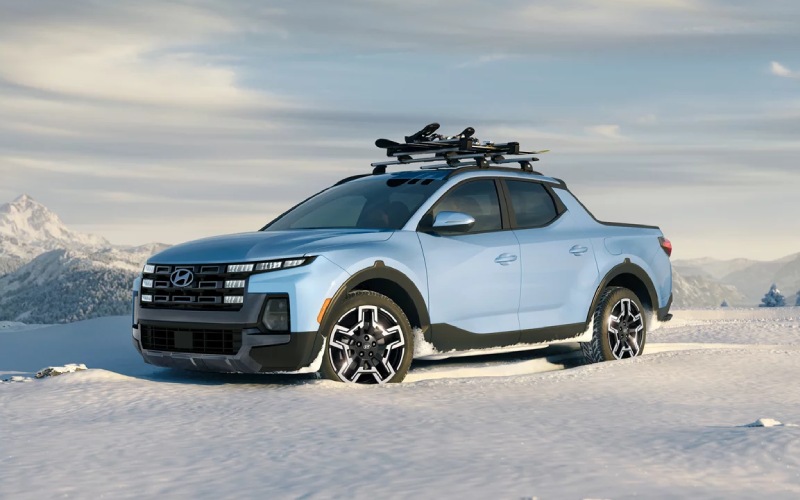
Hyundai of Grand Island – Terrain Mode Select on the 2026 Hyundai Santa Cruz for Winter Drives around St. Paul, NE
When winter sweeps across the plains and the morning commute turns slick, the 2026 Hyundai Santa Cruz shows its smarts with Terrain Mode Select and available HTRAC All Wheel Drive. This compact Sport Adventure Vehicle was designed to feel settled underfoot when the surface is anything but, allowing you to toggle Snow, Mud, and Sand modes to match real-world traction demands. For drivers who split time between neighborhood streets, two-lane highways, and gravel turnoffs to trailheads, the Santa Cruz makes adjusting to conditions as simple as a click of the dial. Pair that capability with an interior anchored by a standard 12.3-inch touchscreen, wireless Apple CarPlay® and Android Auto™, and an available 12.3-inch digital instrument cluster, and you have a winter-ready ride that keeps your hands steady and your day on schedule.
On cold mornings, Snow mode fine-tunes throttle mapping and torque distribution so you pull away smoothly instead of spinning wheels; it also coordinates braking and stability systems to help the vehicle track straight on packed snow. If you hit a stretch of unplowed side road with ruts or soft accumulation, Mud mode helps the Santa Cruz maintain momentum by adapting power delivery and traction control intervention. Sand mode is a favorite for summer—riverbanks and beach-adjacent parking areas often have loose surfaces that demand careful footing—but it also underscores how smartly calibrated the system is across four seasons. Add in available Highway Driving Assist, Surround View Monitor for parking confidence, and Rear Cross-Traffic Collision-Avoidance Assist, and the Santa Cruz blends tactile control with situational awareness when visibility and grip are at a premium.
Bed versatility adds another layer of winter practicality. The sealed underfloor bin drains melted snow from ski boots or muddy gear, and the available integrated tonneau cover shields groceries and tools from blowing powder. Standard tie-downs make it easy to secure salt bags or a compact snowblower, while the available 115V power outlet brings on-the-spot convenience to charge portable work lights or a tire inflator on darker evenings. This is what makes the Santa Cruz stand out in winter—its thoughtful features work together, whether the job is heading to work in a squall or stepping out for a weekend sledding run that turned into an icy parking scenario.
Choosing trims with HTRAC All Wheel Drive and Terrain Mode Select depends on how often you encounter these conditions. The XRT trim bakes in rugged cues and capability, including unique wheels, exterior cladding, and Snow, Mud, and Sand modes that complement its adventurous stance. If premium comfort appeals, Limited delivers upscale features—like memory settings and Hyundai Digital Key 2 Touch—without giving up the confidence you want when temperatures dip. Whichever direction you go, the Santa Cruz feels planted and prepared, easing the mental bandwidth usually spent on winter driving.
As you evaluate options, plan a test drive on streets you use daily. Try Snow mode on a lightly dusted neighborhood route, then switch to Normal on a cleared arterial to feel the difference in throttle and traction control. Note how the suspension filters broken pavement—a hallmark of cold-season roads—and how visibility is enhanced by thoughtful camera tech when snowbanks encroach on corners. One more tip: explore accessory solutions such as bed liners and rail-mounted cleats to keep your winter cargo organized and your truck bed protected.
Hyundai of Grand Island offers guidance tailored to how and where you drive, serving Hastings, St. Paul, and Central City with product specialists who understand the realities of our region’s storms, side roads, and early-morning starts. If winter has a way of reshaping your day, Terrain Mode Select and available HTRAC All Wheel Drive on the 2026 Hyundai Santa Cruz bring control back to you—precisely where it belongs.
Frequently Asked Questions:
How do I engage Terrain Mode Select?
Use the drive mode control to choose Snow, Mud, or Sand; the system adjusts throttle, traction control, and torque distribution to suit the surface.
Does HTRAC All Wheel Drive run all the time?
HTRAC actively manages torque between axles as conditions change, focusing on traction and stability when grip is limited and efficiency when roads are clear.
Which tires should I pair with HTRAC for winter?
All-season tires work well, but dedicated winter tires further enhance stopping and starting performance, especially on ice or packed snow.
- Snow mode focus: Calms throttle, optimizes traction control, and prioritizes steady launches on slick starts.
- Mud mode focus: Helps sustain momentum by allowing measured wheel slip and targeted torque delivery.
- Sand mode focus: Balances power to avoid digging in, keeping the Santa Cruz gliding across soft or loose surfaces.
Request more 2026 Hyundai Santa Cruz information
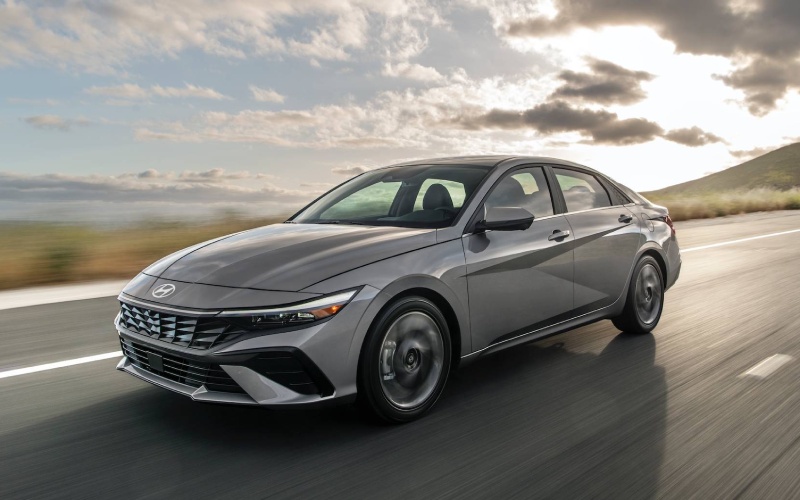
Hyundai of Grand Island – Dual-Screen Clarity on the 2026 Hyundai Elantra for Central City, NE Drivers
When a compact sedan makes technology feel natural instead of complicated, daily driving becomes less stressful and more productive. That’s the idea behind the available dual 10.25-inch displays on the 2026 Hyundai Elantra—one widescreen for infotainment and navigation and one fully digital instrument cluster—arranged side-by-side as a single, sleek visual plane. Instead of splitting attention between mismatched screens, your directions, media, and vehicle data sit within the same sightline, so your eyes spend less time hunting and more time focusing on the road. The result is a cockpit that feels purposeful, polished, and genuinely helpful during a busy week around town or a night drive back from Central City, NE.
Hyundai complements that visual clarity with responsive software and smart organization. Large, legible tiles on the available 10.25-inch touchscreen let you jump between navigation, media, and key settings without extra taps, and the digital gauge cluster puts speed, driver-assistance status, and turn-by-turn info where you expect it. Standard wireless Android Auto™ and Apple CarPlay® on the 8-inch screen keep cords out of the cabin; moving up to the larger display adds more map detail, quicker glanceability, and excellent split-screen layouts that show two data sources at once. From a usability standpoint, that means you can follow routing while monitoring Smart Cruise Control (SCC) with Stop & Go status or upcoming lane changes, all without bouncing between menus.
- Unified visibility: The infotainment and cluster live on a shared plane, making glance checks feel natural.
- Customizable data: Choose layouts that surface what you use most—navigation cues, driver assists, or audio.
- Confident routing: High-resolution mapping and clear prompts reduce last-second lane changes.
- Clean cabin: Standard wireless phone projection on the 8-inch screen cuts cable clutter.
- Everyday readiness: Quick boot-up and intuitive menus help you get moving faster.
Because the dual-screen design pairs so well with Hyundai SmartSense, the tech doesn’t just look refined—it works together. Available Highway Driving Assist (HDA) can visibly cue lane-centering support on the cluster, while Forward Collision-Avoidance Assist and Lane Keeping Assist provide clear on-screen alerts and status icons you can digest at a glance. It’s the difference between technology that interrupts and technology that informs, helping you stay calm and aware when traffic ebbs and flows on Highway 30 or when weather changes make visibility a bit more challenging.
Layer in available Hyundai Digital Key 2 Touch and the Elantra’s digital experience stretches beyond the cabin. Your compatible smartphone can unlock, start, and even share access with a family member—reducing physical keys and giving you more control over daily logistics. Top it off with available Bose® Premium Audio for clean highs and punchy bass, and you’ve got a compact sedan whose tech feels both comprehensive and cohesive. Hyundai of Grand Island helps you compare trims—SE, SEL Sport, SEL Sport Premium, Limited, and N Line—so you can decide how much display real estate and connectivity you want for your routine.
For families and professionals alike, the value of a modern display setup is measured by how little thought it requires. The 2026 Elantra’s available dual 10.25-inch screens blend elegant hardware with sensible software, supported by standard wireless phone projection on the 8-inch system for those who prefer to keep things simple. That flexibility—go bigger for richer maps and multi-view layouts, or go lighter with standard wireless integration—ensures you get exactly the balance you need. And with our team serving Hastings, St. Paul, and Central City, you can test each configuration back-to-back and see how clearly the Elantra communicates on your roads, with your apps, and on your schedule.
Frequently Asked Questions:
Are the dual 10.25-inch displays standard on every Elantra?
No. The dual-screen configuration is available on select trims. The standard 8-inch display supports wireless Android Auto™ and Apple CarPlay®.
Does the digital cluster show navigation directions?
Yes, when equipped, the fully digital instrument cluster can present turn-by-turn prompts and key driver-assistance information within your direct line of sight.
Is wireless charging available?
Yes. An available wireless Qi-compatible charging pad keeps your phone powered while you drive, reducing cable clutter in the cabin.
How does Digital Key 2 Touch help in daily life?
It turns a compatible smartphone into your key and allows secure digital key sharing, helpful for coordinating schedules with family members or trusted drivers.
Request more 2026 Hyundai Elantra information
Hyundai Digital Key 2 Touch — The 2026 Hyundai Kona’s Everyday Convenience for Central City, NE Drivers
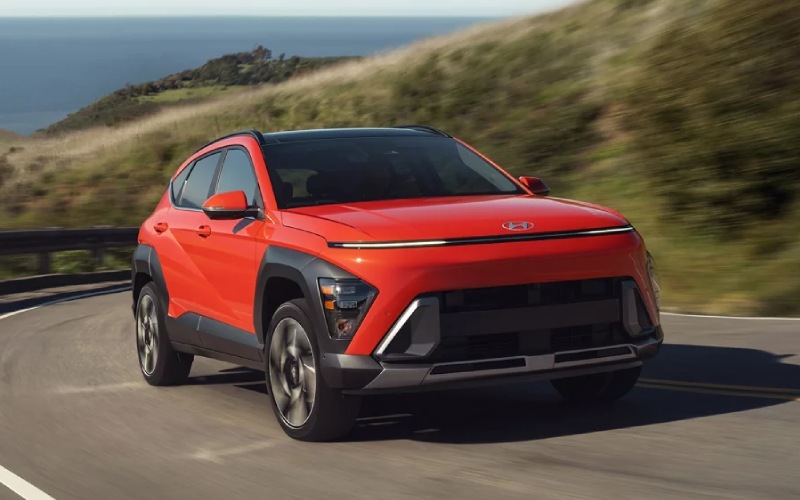
Hyundai of Grand Island – Hyundai Digital Key 2 Touch — The 2026 Hyundai Kona’s Everyday Convenience for Central City, NE Drivers
Hyundai Digital Key 2 Touch turns your compatible smartphone into your key for the 2026 Hyundai Kona, making daily life around Central City, NE easier from the moment you head out the door. Instead of patting your pocket for a fob, you can unlock, start, and share access to Kona using your phone’s secure credentials. Heading out early to beat a snow flurry? Pre-check your cabin, step in, and go—no extra digging for keys. Meeting a friend for a pickup at the park? You can share access with a compatible device, and there’s no waiting around for hand-offs. When you pair Digital Key 2 Touch with Bluelink+, wireless Apple CarPlay® and Android Auto™, and the Kona’s crisp dual 12.3-inch displays, the smartphone you already rely on becomes the command center for your drive, helping you navigate, communicate, and settle in with very little friction.
Setup is refreshingly straightforward. After pairing your compatible device, you’ll store a secure key that allows door access and engine start. On busy days when hands are full—gym bag in one hand, groceries in the other—the phone you’re already holding gets you in and on your way quickly. And if your schedule means other drivers occasionally need the Kona, Digital Key sharing becomes a genuine time-saver. You can extend access for a house sitter, share with a visiting family member, or let a trusted neighbor move the vehicle when a storm rolls in. Add in available HTRAC All Wheel Drive for weather, available Remote Smart Parking Assist on Limited for tight spots, and Kona’s thoughtful interior with available H-Tex® seating and dual automatic temperature control, and you have a compact SUV that meets you exactly where you live.
Because it’s part of a broader tech ecosystem, Digital Key 2 Touch plays nicely with your typical daily flow. You already check traffic, confirm appointments, and run navigation from the phone—now your access to the car is integrated with the same device. And if you’re privacy-minded, you’ll appreciate that the system uses secure credentials and clear sharing controls. That blend of ease and control is what makes Digital Key 2 Touch feel natural after a day or two. It’s the quiet convenience that becomes hard to give up once you’ve tried it.
Drivers who commute in all seasons will also find that digital convenience pairs nicely with Kona’s confidence technologies. Hyundai SmartSense features like Forward Collision-Avoidance Assist with Pedestrian, Cyclist, and Junction Turning Detection and Direct Oncoming, Lane Keeping Assist, and on Limited, Highway Driving Assist, Surround View Monitor, and Blind-Spot View Monitor deliver broad support whether you’re navigating a school pickup lane or merging on a busy highway. Inside, the 12.3-inch touchscreen with available navigation, available Bose® Premium Audio, and wireless device charging help you keep your day humming—and your cords tamed. The result is a cabin that cuts friction and adds calm, which is exactly what busy weeks demand.
Curious about how Digital Key 2 Touch fits your family? Start by thinking through who needs access and when. If you have a teen driver, sharing access during certain windows can add both flexibility and accountability. If your weekend involves meetups at the ball fields or quick hand-offs at a friend’s house, the ability to share and revoke access without extra keys is a genuine upgrade.
Frequently Asked Questions:
Is Digital Key 2 Touch standard on every Kona?
It is available on select trims. Our team can show you which configurations include it and how it pairs with other features you want.
What phones are compatible?
Digital Key 2 Touch supports select Apple® and Android™ devices. We’ll help confirm compatibility and walk you through setup at delivery.
Can I still use a traditional key fob?
Yes. Digital Key 2 Touch is an added convenience—your traditional key and keyless entry functions remain available.
Is sharing access complicated?
No. You can share access with compatible devices in just a few steps and easily revoke access when plans change.
When you’re ready to see how Digital Key 2 Touch and the rest of Kona’s tech come together, stop by for a hands-on demo. Hyundai of Grand Island offers clear, no-pressure guidance and is proudly serving Hastings, St. Paul, and Central City with side-by-side trim comparisons, convenient test drives, and configuration help so you leave with the features that matter most to you.
Request more 2026 Hyundai Kona information
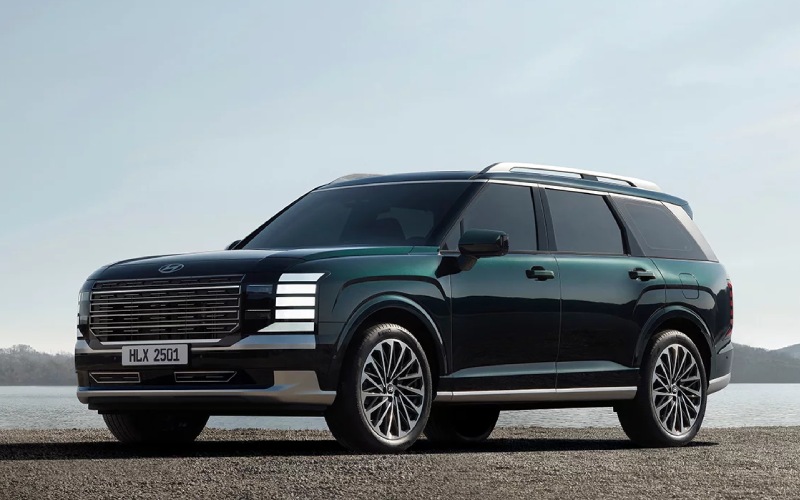
Hyundai of Grand Island – Does the 2026 Hyundai Palisade or 2026 Honda Pilot have smarter everyday safety and driver assistance for families near Central City, NE?
When families compare two trusted names in three-row SUVs, one question rises to the top: Which model offers the safer, more helpful set of driver assists for real-world driving? Looking closely at the latest updates, key differences emerge that affect everything from stress-free school drop-offs to late-night highway drives.
The Palisade’s expanded SmartSense suite brings advanced collision avoidance, Lane Following Assist, Navigation-Based Smart Cruise Control, and an available Remote Smart Parking Assist that can maneuver into or out of tight spots from outside the vehicle using the key fob. A standout is the built-in dual-camera Dash Cam that can continuously record while driving, then automatically capture activity when parked. Add an Advanced Rear Occupant Alert, third-row seatbelt pretensioners and load limiters, and an available digital center rearview mirror for an extra layer of confidence when cargo or passengers block the rear window. By contrast, the Pilot’s Honda Sensing suite is comprehensive and proven, but it does not add an integrated dash cam, remote smart parking, or third-row pretensioners – the kind of details that matter in everyday life.
For quick reference, here are practical safety and assistance differences shoppers ask about most often:
- Built-in Dash Cam: Palisade adds a dual-camera Dash Cam with driving and parked-recording capability; Pilot does not offer a built-in system.
- Remote Smart Parking Assist: Palisade offers available RSPA for outside-the-vehicle parking moves; Pilot does not include a comparable feature.
- Third-row seatbelt pretensioners: Palisade adds pretensioners and load limiters in the third row; Pilot does not advertise third-row pretensioners.
- Digital center rearview mirror: Palisade offers an available camera-based mirror to see past passengers or cargo; Pilot does not list this feature.
- Over-the-air updates: Palisade supports wireless OTA updates for vehicle systems; Pilot focuses on Google built-in for infotainment without system-wide OTA.
These features complement Palisade conveniences like standard wireless Apple CarPlay® and Android Auto™, plus available Wi-Fi hotspot capability with Alexa Built-in and Digital Key 2 for smartphone or smartwatch access. Meanwhile, the Pilot offers Google built-in, a multiview camera system on upper trims, and a well-tuned suite of essentials for highway and city driving. Both SUVs offer confident handling and family-ready space, but Palisade’s additional layers of protection and ease-of-use are the difference-makers for many shoppers.
At Hyundai of Grand Island, we guide families through hands-on demos of the tech they will use most – from camera-based visibility and lane-centering support to remote parking and customizable driver profiles. Our goal is clarity: help you understand what each assist does, where it shines, and how it supports your confidence on busy weekdays and long-distance trips.
We are serving Hastings, St. Paul, and Central City with a friendly, transparent approach that lets you compare features side-by-side and choose the configuration that best suits your routine. If your priorities include advanced safety that quietly works in the background and convenience tech that streamlines every drive, the Palisade’s latest innovations deserve the top spot on your test-drive list.
Frequently Asked Questions:
Does the Palisade have driver assists that work on curvy highways?
Yes. Navigation-Based Smart Cruise Control can proactively reduce speed ahead of curves and then resume your set speed, while Lane Following Assist helps keep you centered within lane markings on well-marked roads.
Can I see behind the vehicle if the third row is full of passengers?
The Palisade offers an available digital center rearview mirror that uses a liftgate-mounted wide-angle camera to provide a clear view behind the vehicle, even if the rear window is blocked.
Will the Palisade alert me if I forget to check the back seat?
Yes. An Advanced Rear Occupant Alert can help detect movement in the rear seats after the vehicle is locked and can trigger alerts to prompt a check, adding reassurance during busy days.
Is there a built-in dash cam in either SUV?
The Palisade includes a built-in dual-camera Dash Cam capable of recording while driving and when parked. The Pilot does not include an integrated dash cam feature.
Request more 2026 Hyundai Palisade information
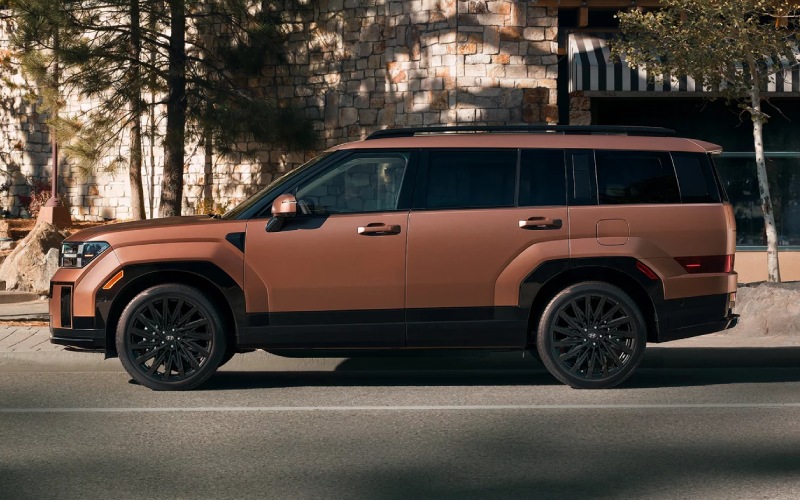
Hyundai of Grand Island – See More, Stress Less – Full-Display Digital Rearview Mirror on the 2026 Hyundai SANTA FE for Central City, NE Drives
Backing out of a busy lot after a ballgame or merging at dusk on a two-lane highway — these are the moments when visibility matters most. The 2026 Hyundai SANTA FE offers an available full-display digital rearview mirror that replaces the traditional reflection with a crisp, real-time video feed from a rear camera. This isn’t a novelty; it’s a thoughtful visibility upgrade that helps you see beyond headrests, cargo, and tall passengers in the third row. Even when the vehicle is fully loaded for a weekend away, the mirror’s expansive view remains clear, giving you more confidence to read the road behind you.
The technology works seamlessly in day-to-day driving. With the camera mounted high to reduce glare and road spray interference, the display shows what’s directly behind you — not just what your cabin allows you to see. Nighttime clarity is a standout, which is a welcome benefit for rural commutes and evening returns on unlit stretches. Pair it with available Surround View Monitor (SVM) for tight-angle perspectives in parking scenarios, and you have a visual toolkit that helps simplify life’s trickiest low-speed maneuvers. For families swapping drivers, the mirror’s consistency is especially helpful — you won’t need to re-angle it every time someone hops in behind the wheel.
- Unobstructed perspective: See past passengers, cargo, and pillar angles that can block a conventional mirror.
- Consistent clarity: Crisp video feed helps in dusk, nighttime, and low-contrast conditions.
- Parking partner: Complements available Surround View Monitor (SVM) and available Remote Smart Parking Assist (RSPA).
- Confidence with a full cabin: Keep visibility when all three rows are occupied.
- Easy to use: Switch between traditional reflection and digital view with a simple control.
Many drivers also ask how this feature fits with the rest of Hyundai SmartSense. The short answer is that it strengthens your overall situational awareness. While features like Lane Following Assist and Blind-Spot View Monitor provide guidance and alerts, the digital rearview mirror raises your baseline view so you’re starting with more information every time you glance up. It’s a simple, intuitive addition that reduces second-guessing during lane changes and helps you better judge approaching vehicles as you prepare to merge.
For growing families, the mirror resolves a common pain point: seeing past sports gear, pets, strollers, and coolers. Load up for a Saturday tournament without worrying that your visibility will suffer. Combine that with the SANTA FE’s spacious third row, available captain’s chairs, and dual 12.3-inch displays up front, and you have a cabin designed for people, stuff, and stress-free travel. The result is everyday confidence — the kind you appreciate whether you’re tackling school traffic or setting out before sunrise for a long weekend.
Curious about how the full-display digital rearview mirror looks in person? Our team can show you how it works alongside the available Surround View Monitor and explain which SANTA FE trims include it. Hyundai of Grand Island is here to help you compare features side by side so you can decide what fits your driving. We’re proud of how thoughtfully the system integrates with the rest of the vehicle’s technology — from Bluelink+ connectivity to available Highway Driving Assist — because the best safety and convenience features fade into the background and simply make your day easier.
Frequently Asked Questions:
Does the digital rearview mirror replace side mirrors?
No. It complements your side mirrors and rear camera views, giving you a wider, unobstructed look behind the vehicle.
Can I switch back to a normal mirror view?
Yes. You can toggle between a traditional reflected view and the digital video feed with a simple control on the mirror.
Is the mirror helpful at night?
Absolutely. The high-mounted camera and display tuning provide clearer detail in low light than a conventional mirror can offer.
How does it work with Surround View Monitor?
The digital mirror gives you a straight-line, rear-facing view in real time, while SVM stitches multiple camera feeds for a bird’s-eye perspective. Together, they make backing and parking easier.
Ready to see the feature in action on a test drive? We’re serving Hastings, St. Paul, and Central City with product specialists who can tailor a walkthrough to your daily driving. Bring your questions — and a fully loaded cargo area if you like — and watch how the digital mirror keeps your view clear even with the third row in use.
Request more 2026 Hyundai Santa Fe information
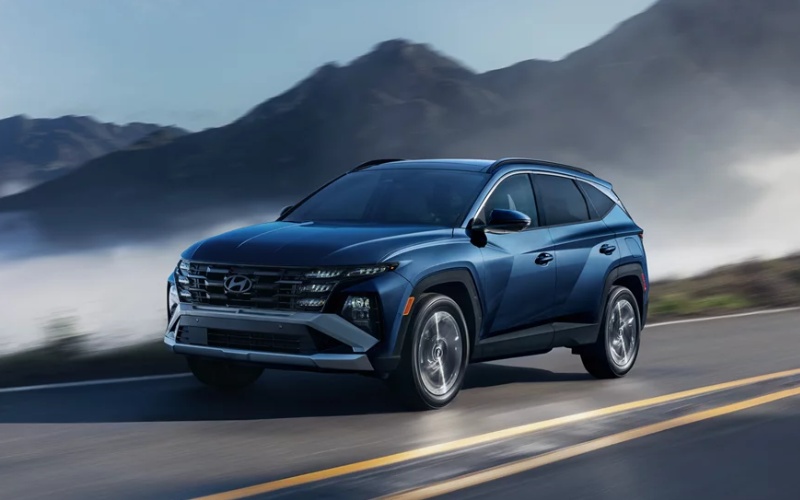
Hyundai of Grand Island – What are the highlights of the Panoramic Curved Display in the 2026 Hyundai Tucson for Central City, NE Drivers
The cabin is where you spend every mile, and the 2026 Hyundai Tucson makes that space smarter with an available panoramic curved display that pairs a 12.3-inch digital instrument cluster and 12.3-inch touchscreen navigation. For Central City, NE drivers who juggle family logistics, work calls, and weekend trips, this sweeping, unified interface puts key info in one natural sightline. The result is less hunting through menus and more confidence staying focused on the road. You’ll see crisp, high-contrast graphics for turn-by-turn guidance, safety alerts, and media, with responsive touch inputs that keep tasks quick. And when those Nebraska skies turn gray, you’ll appreciate the clear, legible readouts that remain easy to see in varied light.
Beyond its polished look, the curved display complements Tucson’s connected core. Wireless Android Auto™ and Apple CarPlay® simplify daily routines—start a playlist, check your calendar, or message hands-free. With Bluelink+, you can remotely start, lock, or precondition the cabin from your smartphone, so your Tucson feels ready when you are. On select trims, tech like Highway Driving Assist, Navigation-based Smart Cruise Control with Curve Control, and available Blind-Spot View Monitor integrate naturally into the digital layout, adding real-time support without overwhelming your senses. The combination of glanceable driving data, a clean menu structure, and familiar smartphone mirroring helps the entire family settle in faster—no lengthy learning curve required.
- Simplified visibility: The cluster and touchscreen sit in one gentle arc, placing maps, alerts, and media within a consistent field of view.
- Quick familiarity: Intuitive menus and smartphone-style layouts reduce the time it takes to feel fully comfortable.
- Helpful context: Driver aids surface at the right moment, making it easier to interpret system prompts.
- Daily comfort: Crisp graphics and smooth responsiveness make longer drives feel calmer and more organized.
- Family friendly: From podcasts to kid playlists, your go-to content is always close at hand.
Families also appreciate how Tucson’s cabin architecture supports that digital-first experience. The low, tidy dashboard lets the curved display stand out without adding visual clutter, while ambient lighting on upper trims subtly frames switches and storage areas for nighttime clarity. Dual automatic temperature control, abundant USB-C charging points, and available features like a hands-free smart liftgate and Hyundai Digital Key 2 add thoughtful touches that keep pace with busy days. Whether you’re loading up the cargo area for a sports tournament or heading home after late-night shopping, the interface and interior work together to reduce friction at every step.
As with any in-vehicle tech, questions come up—especially about updates and compatibility. Tucson’s Over-the-Air capabilities allow select software enhancements to arrive seamlessly, keeping your system fresh. If your family mixes Android and Apple devices, the standard wireless pairing removes a few more cords from the picture. And for those eyeing extra driver assistance, available features such as Surround View Monitor and Remote Smart Parking Assist on upper trims layer neatly onto the display strategy: clear visuals, consistent prompts, and minimal distraction.
Hyundai of Grand Island provides hands-on walkthroughs so you can explore the curved display’s layout and shortcuts before you ever leave the lot. Our product specialists will help you set preferred home screens, customize driver profiles, link your favorite apps, and preview navigation options so your first week feels second nature. We’re proudly serving Hastings, St. Paul, and Central City, and we can tailor a trim discussion—SE, SEL, SEL Premium, XRT, or Limited—around the features that matter most to you. If you want the cabin to mirror your digital life without a steep learning curve, Tucson’s panoramic curved display is a standout reason to put this SUV at the top of your list.
Frequently Asked Questions:
Does every Tucson include the panoramic curved display?
No. The 12.3-inch touchscreen is standard, while the panoramic curved display is available on select trims. We can help you compare screens side by side.
Will the curved display work with my phone case or older device?
Most modern smartphones pair wirelessly via Android Auto™ or Apple CarPlay®. If you use an older device, we can test compatibility and suggest simple workarounds.
Can the display get software updates over time?
Yes. Select software enhancements can be delivered via Over-the-Air updates to keep key systems current.
Is the screen easy to see in bright sunlight?
The display is designed for clarity across a wide range of lighting conditions with crisp contrast and readable fonts.
Request more 2026 Hyundai Tucson information
Hyundai of Grand Island – Recommended service and maintenance schedule for Hyundai Palisade
Your Hyundai Palisade thrives on a thoughtful, consistent maintenance plan—one that protects performance, comfort, safety systems, and long-term value. At Hyundai of Grand Island, our factory-trained technicians use Genuine OEM parts and state-of-the-art diagnostics to build a plan around how you actually drive, whether that includes frequent short trips, towing, dust, or extreme temperatures. We record services, watch for software updates, and help you time visits so that routine items like oil, filters, tires, and fluids are handled together, saving you time. Because intervals can vary by model year and driving conditions, always review your Owner’s Manual and contact the manufacturer or our team for details. The guidelines below reflect what most Palisade owners follow, including checks that keep Advanced Driver Assistance Systems performing as designed. From HTRAC All Wheel Drive components to brake fluid testing, our goal is simple—keep your Palisade feeling tight, quiet, and confident while preserving warranty coverage and resale value. Stop by our comfortable service lounge or book online; we can send reminders, honor your schedule, and provide clear, line-by-line recommendations without pressure. When you want experienced care close to home, count on our crew to get you in, get it right, and get you back on the road safely in Grand Island, NE.
- Every 7,500 miles or 6 months: Change engine oil and filter; rotate tires; inspect brakes; test battery; top off fluids; check wiper blades and exterior lights; reset maintenance minder.
- 15,000 miles or annually: Replace cabin air filter if needed; perform 4-wheel alignment check and balance tires; inspect pads, rotors, hoses, and parking brake; inspect steering and suspension components.
- 30,000 miles: Replace engine air filter; test brake fluid and service as needed; inspect cooling system and hoses; inspect HTRAC All Wheel Drive components and transfer case for leaks; perform fuel system cleaning if recommended.
- 45,000 miles: Repeat 15,000-mile inspections; inspect drive belts, CV boots, and exhaust; evaluate shocks and struts for wear.
- 60,000 miles: Inspect or service automatic transmission fluid based on use; check coolant condition; service AWD differential and transfer case fluids if towing or off-road; replace brake fluid if 3 years old.
- 90,000-120,000 miles: Replace spark plugs and engine coolant per Owner’s Manual; inspect water pump and drive belt; replace cabin and engine air filters if due; comprehensive multi-point inspection.
- Every visit: Check for software updates to Navigation and Infotainment; verify sensors and cameras for Blind-Spot Collision-Avoidance Assist, Safe Exit Assist, and Remote Smart Parking Assist; measure tread depth and set tire pressures, including the spare.
Ready to personalize a maintenance plan that fits your mileage and usage? Request more information, schedule your next visit, or ask for a quick service consultation—our advisors, serving Hastings, St. Paul, and Central City, will confirm the right intervals for your Palisade and keep every appointment simple, transparent, and efficient.
Request more information
Connect with us


Hyundai of Grand Island
Address
3312 West Stolley Park Road
Grand Island, NE 68803
Phone
- Sales 308-318-3282308-318-3606
- Service 308-318-3848
- Parts 308-318-4342
| Monday | 8:00AM - 7:00PM |
| Tuesday | 8:00AM - 7:00PM |
| Wednesday | 8:00AM - 7:00PM |
| Thursday | 8:00AM - 7:00PM |
| Friday | 8:00AM - 7:00PM |
| Saturday | 8:00AM - 6:00PM |
| Sunday | Closed |
| Monday | 7:30AM - 6:00PM |
| Tuesday | 7:30AM - 6:00PM |
| Wednesday | 7:30AM - 6:00PM |
| Thursday | 7:30AM - 6:00PM |
| Friday | 7:30AM - 6:00PM |
| Saturday | Closed |
| Sunday | Closed |
| Monday | 8:00AM - 5:00PM |
| Tuesday | 8:00AM - 5:00PM |
| Wednesday | 8:00AM - 5:00PM |
| Thursday | 8:00AM - 5:00PM |
| Friday | 8:00AM - 5:00PM |
| Saturday | Closed |
| Sunday | Closed |