



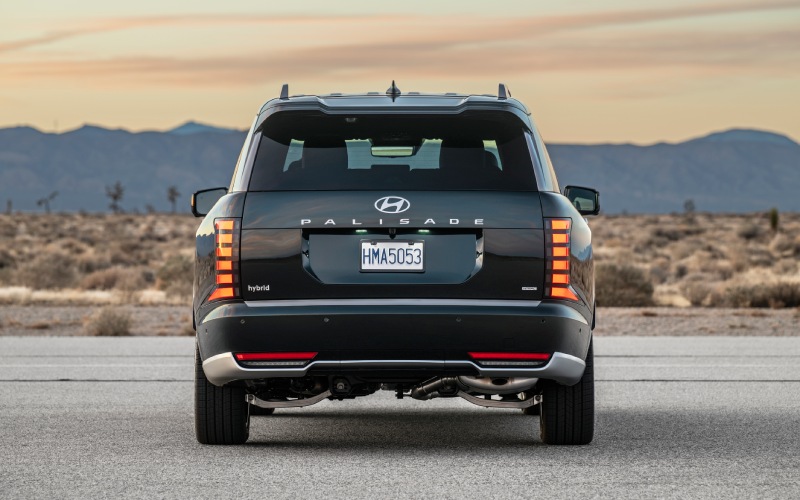
Hyundai of Grand Island – Can I use Hyundai Digital Key 2.0 Premium on the 2026 Hyundai Palisade in Grand Island, NE?
For many families in Grand Island, simplifying life starts with taking one more thing out of your pocket. If you are considering the 2026 Hyundai Palisade, you can leave a traditional key fob behind and still lock, unlock, and start your SUV using a compatible smartphone or smartwatch. At Hyundai of Grand Island, we help local drivers set up Hyundai Digital Key 2.0 Premium every day, and we want to share how it works in real Central Nebraska life—school drop-offs on College Street, errands along US-281, and weekend meetups at Stolley Park.
The 2026 Palisade introduces a host of everyday upgrades—like wireless Apple CarPlay® and Android Auto™, 100-watt USB-C ports in each row, and available features such as a full-display digital rearview mirror and a built-in dual-camera Dash Cam—but Digital Key 2.0 Premium stands out because it changes how you access and share your vehicle. Here is what in-market shoppers around Grand Island, NE should know before making the switch.
What is Hyundai Digital Key 2.0 Premium on the 2026 Palisade?
Hyundai Digital Key 2.0 Premium lets you use a supported smartphone or smartwatch instead of the key fob to lock, unlock, and start the Palisade. You can also securely share a digital key with family or trusted contacts and set permissions. It is designed to be convenient for daily life and flexible enough for changing schedules.
- Core convenience: Use a compatible phone or smartwatch to lock/unlock doors and start the engine.
- Key sharing: Grant and revoke access for family or friends through the app, with time or feature limits.
- Everyday reliability: Works at the vehicle without needing to open an app—just approach, tap, or place your device per on-screen prompts.
- Dealer support: We help you pair devices, confirm features, and practice real-world use before you drive home.
Because device compatibility can vary, we will verify your phone or wearable in-store and walk you through setup so it feels seamless from day one.
How Digital Key fits daily life in Grand Island
Picture your Tuesday: a quick stop at the Railside District, a grocery run off West 13th Street, and two trips through the Grand Island Senior High drop-off lane. Digital Key 2.0 Premium means you can keep your phone in your pocket or bag and still access the Palisade quickly—no fumbling for a key while you guide kids, backpacks, and sports gear.
Where it shines locally is key sharing. If your partner needs the Palisade for a late pickup from practice at Ryder Park, you can share access from your phone. Hosting relatives for a weekend at the Stuhr Museum or Island Oasis? Share a temporary key and revoke it when they head out. For babysitters, neighbors, or trusted teammates, you decide who can enter, drive, or only unlock to load cargo.
What setup looks like with our team
We make setup hands-on and simple during your delivery appointment so you leave confident. The process focuses on pairing your device and learning your favorite access method.
- Download or open the MyHyundai app with Bluelink® on your supported device.
- With our guidance, pair your 2026 Palisade to your account inside the vehicle.
- Add your Digital Key to your phone or watch wallet where available, and confirm your preferred access method.
- Practice locking/unlocking and starting the Palisade with your device until it feels second nature.
- Test secure sharing with a family member to see how permissions and revoking work.
Not every device or wearable supports every Digital Key feature. We recommend bringing the phone and smartwatch you plan to use to your test drive so we can check compatibility together.
Security, privacy, and peace of mind
Digital Key 2.0 Premium uses modern, secure protocols and ties access to your authenticated account. You control who gets a key, what they can do, and for how long—and you can revoke access instantly if plans change. The Palisade also supports a traditional key fob, so you can keep one as a backup if that makes you more comfortable as you get used to Digital Key. For added confidence while parked at home near Stolley Park or in a downtown lot, the Palisade’s built-in dual-camera Dash Cam can continuously record while driving and can capture motion-related events when parked, adding another layer of awareness for everyday life.
Tips we share with Palisade owners
Over hundreds of local deliveries, we have learned a few practical habits that make Digital Key 2.0 Premium even smoother.
- Confirm compatibility: Bring your smartphone and smartwatch to your test drive so we can validate supported features.
- Set sharing rules: Before you send a digital key, choose whether that person can drive or just unlock to load gear.
- Practice your routine: Try locking, unlocking, and starting using your device in our lot so it is easy at school pickup lanes.
- Keep a backup plan: If you are still getting comfortable, store the key fob in a safe place you can access in a pinch.
- Update regularly: Accept app and vehicle Over-The-Air updates when available to keep features current.
With these small steps, most owners are using Digital Key confidently within a day or two—especially once they experience how quick hands-free access can be when wrangling kids, coolers, or folding camp chairs for a ball game at Ryder Park.
Where Digital Key fits in the 2026 Palisade lineup
The 2026 Palisade offers the latest Hyundai Digital Key 2.0 Premium alongside a wide array of everyday tech: a panoramic curved display with dual 12.3-inch screens, standard wireless Apple CarPlay® and Android Auto™, available Bose® 14-speaker audio, and wireless Over-The-Air updates. Because features can vary by trim, we will help you compare in stock Palisade models on our lot—from family-ready configurations with power-folding third row to adventure-leaning XRT PRO—so the tech you want is truly the tech you get.
If you are also weighing winter confidence, HTRAC® All-Wheel Drive with Snow mode is available. Pairing HTRAC® with Digital Key 2.0 Premium means your Palisade is convenient to access and capable when weather turns on the open plains around Wood River or Doniphan.
How Digital Key plays with other everyday features
What most new owners love is how Digital Key becomes part of a bigger, thoughtful tech ecosystem. Once you are in, standard wireless Apple CarPlay® or Android Auto™ picks up your podcast or route, 100-watt USB-C ports in each row keep devices charged, and the available full-display digital center rearview mirror helps you see clearly even when cargo is stacked to the roof. It all feels designed to remove friction from daily driving in and around Grand Island.
If you want a guided run-through, visit us at 3312 West Stolley Park Road. We will pair a device, share a key with a staff phone so you can see exactly how permissions work, answer security questions, and send you out for a drive that mirrors your real routine—coffee stop, school lane, and a quick lot park-to-repark using the Palisade’s available driver-assist technology.
Frequently Asked Questions:
Will Hyundai Digital Key 2.0 Premium work with my phone or smartwatch?
Digital Key 2.0 Premium requires a compatible smartphone or smartwatch. Compatibility varies by device and operating system. Bring your devices to our showroom and we will verify support and set everything up with you.
Do I still get a key fob with the 2026 Palisade?
Yes. You can keep and use the traditional key fob anytime. Many owners start with both for a short period, then move to phone-first once they are comfortable.
What happens if my phone battery is low or my device is unavailable?
You can always use the key fob. For peace of mind on longer drives or when you are learning the feature, we recommend keeping the fob accessible. We will also walk through best practices for your specific device during delivery.
Can I limit what a shared digital key can do?
Yes. You can set permissions and revoke access at any time. For example, you might allow a neighbor to unlock and move the vehicle in the driveway, while a family member gets full drive access for a set time window.
Does Digital Key rely on a cell signal?
Your device must be set up and authenticated, but access at the vehicle does not require you to open an app or rely on a live cellular connection. We will demonstrate how your specific device interacts with the Palisade at the vehicle.
Is Digital Key secure?
Digital Key 2.0 Premium uses secure, modern protocols and ties access to your authenticated account. You decide who gets a key, for how long, and with what permissions—and you can revoke it instantly in the app.
Hyundai designed the 2026 Palisade to make every day easier—from the spacious, reimagined third row and available power-folding seats to proven Hyundai SmartSense driver assistance and thoughtful touches like available heated third-row seating. Hyundai Digital Key 2.0 Premium fits right into that mission with convenient, controlled access that feels natural in Grand Island life. Visit Hyundai of Grand Island to try it yourself—we will pair your devices, help you share a key, and send you on a drive that shows how quickly this feature becomes a habit you can rely on.
Request more 2026 Hyundai Palisade information
Connect with us


Hyundai of Grand Island
Address
3312 West Stolley Park Road
Grand Island, NE 68803
Phone
- Sales 308-318-3282308-318-3606
- Service 308-318-3848
- Parts 308-318-4342
| Monday | 8:00AM - 7:00PM |
| Tuesday | 8:00AM - 7:00PM |
| Wednesday | 8:00AM - 7:00PM |
| Thursday | 8:00AM - 7:00PM |
| Friday | 8:00AM - 7:00PM |
| Saturday | 8:00AM - 6:00PM |
| Sunday | Closed |
| Monday | 7:30AM - 6:00PM |
| Tuesday | 7:30AM - 6:00PM |
| Wednesday | 7:30AM - 6:00PM |
| Thursday | 7:30AM - 6:00PM |
| Friday | 7:30AM - 6:00PM |
| Saturday | Closed |
| Sunday | Closed |
| Monday | 8:00AM - 5:00PM |
| Tuesday | 8:00AM - 5:00PM |
| Wednesday | 8:00AM - 5:00PM |
| Thursday | 8:00AM - 5:00PM |
| Friday | 8:00AM - 5:00PM |
| Saturday | Closed |
| Sunday | Closed |